-
DD
KeymasterMay 23, 2022 at 12:00 in reply to: AntiSpam Captcha issueIf you can make it working with a default wp theme + buddypress then it will work with a onecommunity too. How about this solution? -> https://akismet.com
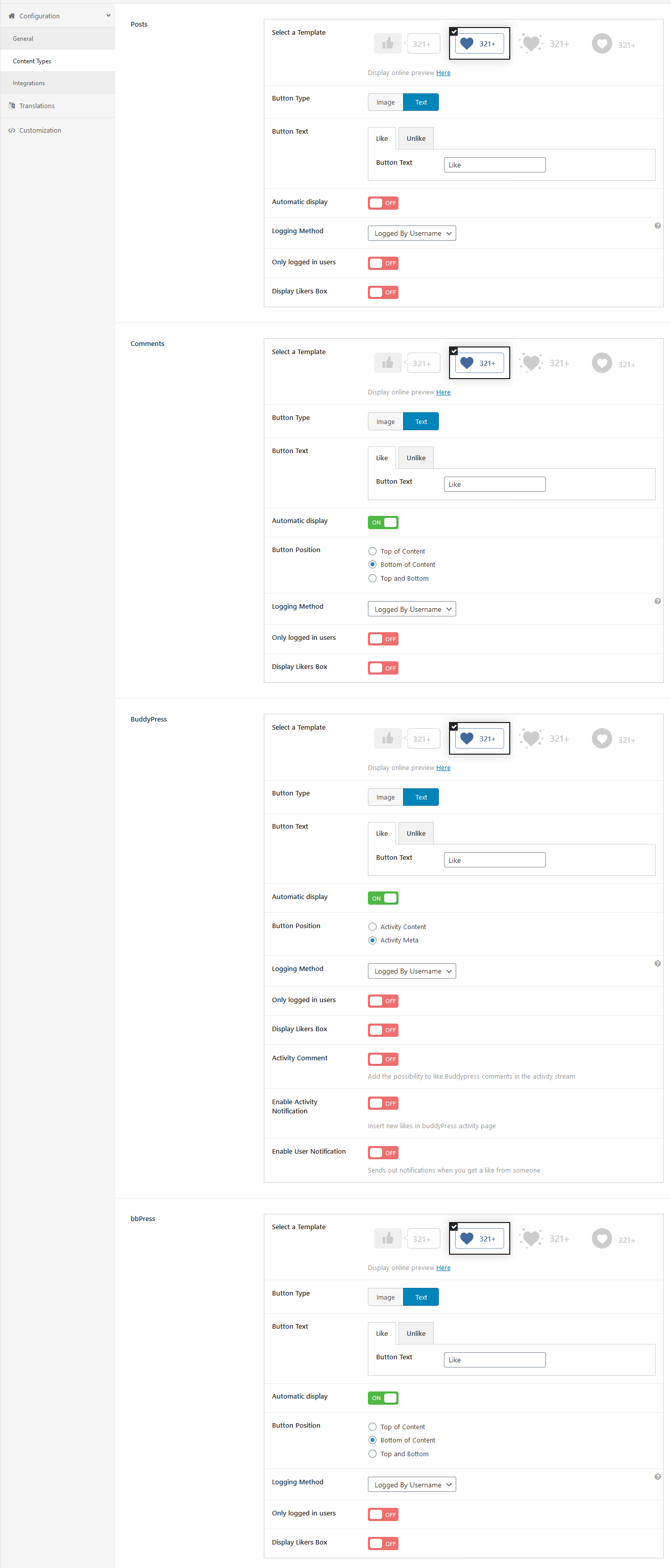
KeymasterPosts section -> Automatic display -> Off
Just like on this screenshot -> https://diaboliquedesign.com/demo/onecommunity-new/Help/assets/ulike.pngKeymasterMay 23, 2022 at 11:53 in reply to: Profile bug and weir distortionPlease open wp-content/themes/onecommunity/buddypress/common/js-templates/messages/index.php, remove everything and paste it -> https://pastebin.com/62q4uhTY
KeymasterYou should turn of automatic display for posts, the like button is hardcoded below title.
KeymasterMay 20, 2022 at 08:03 in reply to: AntiSpam Captcha issueUnfortunately I don’t know which is the best.
KeymasterFor hide avatar it would be:
.elementor-post__card .elementor-post__avatar { display:none!important; }KeymasterHow do I do that? Where do I find the selectors?
Please check it out – https://diaboliquedesign.com/demo/onecommunity-new/Help/#customize
Additionally here is a trick how to easy find styling of each theme element using web browser.
You should make all WP Ulike settings similar to this screenshot – https://diaboliquedesign.com/demo/onecommunity-new/Help/assets/ulike.png
KeymasterMay 19, 2022 at 07:09 in reply to: AntiSpam Captcha issueYes, it does.
But does it work with a default WP theme on the Buddypress registration page?
KeymasterMay 18, 2022 at 11:19 in reply to: AntiSpam Captcha issueDoes it work when a default WP theme is active? recaptcha plugin should be compatible with buddypress.
KeymasterNot replace, but wrap code which you want to hide.
KeymasterMay 18, 2022 at 11:14 in reply to: Demo import failed..I replied to your email.
KeymasterFirst you should know the name of the selector of this avatar and replace it
.selector-nameKeymasterPlease use this custom CSS snippet:
.single-post main#content article {
  float: left;
  width: 100%;
}
Also, on the main page, on each article is the author avatar. How do I take it off?
This is not a part of theme, you can hide it with CSS, something like
.selector-name { display:none!important; }KeymasterHow about this shortcode?
[bbp-single-view id='popular']KeymasterYou should open this file wp-content/themes/onecommunity/docs/single/index.php and wrap code with code lime this:
<?php if( current_user_can('editor') || current_user_can('administrator') ) { ?> // Stuff here for administrators or editors <?php } ?>KeymasterMay 16, 2022 at 13:01 in reply to: Profile bug and weir distortionAlso, when I try to send someone a private message I noticed that the Messages box is distorted (if I zoom our, or acces this settings from mobile) I get two Message boxex.
There will be theme update within max 2 days fixing this issue.
KeymasterMay 16, 2022 at 11:51 in reply to: Profile bug and weir distortionThis theme doesn’t even contain
class="no-count"class. Does it happen when a default WP theme is active or english language us selected? Keymaster
You should open wp-content/themes/onecommunity/single.php, cut it:
<aside id="left">
...
</aside>
and paste it removing wrapping
<aside id="left">...</aside>before</article>And the last thing (the small bar that is in the green star) which is the like button, how do I change that for a thumbs up or a heart?You should setup all setting of WP Ulike plugin like on this screenshot – https://diaboliquedesign.com/demo/onecommunity-new/Help/#ulike
KeymasterKeymasterMay 13, 2022 at 07:05 in reply to: Login form issueI need password entry to your site so I will test it.
KeymasterMay 12, 2022 at 10:28 in reply to: Login form issueWhat web browser? Does it happen to all browsers? Does it work on the wp-login.php page?
KeymasterMay 6, 2022 at 08:43 in reply to: Share button on postsNo, but code edit is easy, you should edit the single.php file inside this div:
<div class="aside-share"> ... </div>KeymasterMay 4, 2022 at 13:38 in reply to: Fatal Error after Demo-ImportHow can I install/change the font to a lokal font?
First make sure the font is not available on https://fonts.google.com, if it is then you can change it easy under customizer -> fonts. Otherwise you can try this plugin – https://wordpress.org/plugins/custom-fonts/
KeymasterMay 2, 2022 at 12:01 in reply to: Dark Mode IssueHello
You can hide the switcher adding following CSS snippet under appearance -> customize -> additional css or just disable Enable dark mode under appearance -> customize -> dark mode
#dark-mode-container { display:none!important; }it made my logo disappear
You should go to appearance -> customize -> dark mode and setup Logo visible under dark mode (260px x 70px)
KeymasterApril 30, 2022 at 10:31 in reply to: Errors When Installing ThemeHello
Please try to install this plugin – https://wordpress.org/plugins/classic-widgets/
KeymasterApril 27, 2022 at 08:37 in reply to: Ajax Search Pro update failedHello
Please remove this plugin and install once again using installation wizard visible on the top of the page.
KeymasterApril 27, 2022 at 08:28 in reply to: Fatal Error after Demo-ImportIf you want to use theme with the Youzify plugin then you should install the special version of theme which is inside the Youzify folder.
KeymasterApril 26, 2022 at 09:35 in reply to: Fatal Error after Demo-ImportHello
Can you try to install this widget? – https://wordpress.org/plugins/classic-widgets/
KeymasterIt’s just warning which doesn’t affect the site. The problem can be caused by 3rd party plugin. Actually I can’t duplicate this warning on the live demo.
KeymasterPlease post code here – https://pastebin.com/
KeymasterAlso please try to add following code lines in the wp-config.php file:
ini_set('display_errors','Off'); ini_set('error_reporting', E_ALL );KeymasterDid you try the solution above?
KeymasterApril 16, 2022 at 17:54 in reply to: categories iconHello
List of all categories icons is here – wp-content/plugins/onecommunity-shortcodes/img/category/
You can just rename category icon which is related to the category slug.KeymasterApril 16, 2022 at 17:48 in reply to: How to display posts on sliderHello
They are cached by transients, you can disable it under appearance -> customize -> transients
KeymasterBoth shortcodes are defined here –
wp-content/plugins/onecommunity-shortcodes/inc/bp-activity-entry.php
wp-content/plugins/onecommunity-shortcodes/inc/blog.phpKeymasterApril 8, 2022 at 15:40 in reply to: Manage Group is not workingI think it wouldbe the best if you turn off cloudflare, enable debug mode in wp-config.php so there will be more detailed error.
KeymasterApril 8, 2022 at 11:16 in reply to: Manage Group is not workingNot all plugins are working with PHP 8 yet. Please go to WP Dashboard → Settings → BuddyPress and make sure all components are enabled.
KeymasterApril 7, 2022 at 12:52 in reply to: Manage Group is not workingWhat PHP version do you use? Try to remove all widgets for the Groups Sidebar widget area.
KeymasterApril 7, 2022 at 12:43 in reply to: How to use AVATAR galleryI have never heard about such buddypress/youzify extension.
KeymasterApril 7, 2022 at 11:33 in reply to: Manage Group is not workingWell, you are the first client with such problem. Is this page working when a default WP theme is active?
KeymasterApril 6, 2022 at 19:26 in reply to: Manage Group is not workingThere is still server related problem – https://diaboliquedesign.com/screenshots/3/Screenshot-at-21-25-57.png
It can be caused by 3rd party plugin. Does it work when a default WP theme is active?KeymasterHello
Please check it out – https://themeforest.net/item/onecommunity-buddypress-theme/3713046/faqs/25664
KeymasterApril 5, 2022 at 21:40 in reply to: Link colorWhat page? It should be underline – https://diaboliquedesign.com/demo/onecommunity-youzer/about-us/
KeymasterApril 5, 2022 at 21:34 in reply to: Manage Group is not workingI see it works fine now.
KeymasterApril 5, 2022 at 21:27 in reply to: How to use AVATAR galleryUnfortunately there is no such gallery.
KeymasterPlease check it out – https://diaboliquedesign.com/demo/onecommunity-new/Help/#translate
You should translate Youzify this way.KeymasterApril 4, 2022 at 12:26 in reply to: how to add right panelIt’s visible – https://diaboliquedesign.com/screenshots/3/Screenshot-at-14-26-54.png
KeymasterApril 4, 2022 at 12:25 in reply to: I can't import demo contentThis is the old link, the new one is in the latest package.
KeymasterApril 4, 2022 at 12:17 in reply to: How to change Buddypress languageYou should install language pack for buddypress and youzify too.
KeymasterApril 4, 2022 at 12:00 in reply to: How to use AVATAR galleryIt’s right there – https://diaboliquedesign.com/screenshots/3/Screenshot-at-14-00-36.png
KeymasterApril 4, 2022 at 11:51 in reply to: Manage Group is not workingUnfortunately usually support doesn’t work on weekends. Your website isn’t working – https://diaboliquedesign.com/screenshots/3/Screenshot-at-13-48-02.png
a11y is related to easy access for underprivileged people.
KeymasterApril 2, 2022 at 10:13 in reply to: Manage Group is not workingHello
It’s caused by a11y related plugin.
KeymasterPlease open the wp-content/plugins/onecommunity-shortcodes/inc/buddypress.php file and change
type=popular&max=14for:
type=active&max=14also remove current here
class="tab-popular current"and paste it hereclass="tab-active"KeymasterMarch 23, 2022 at 09:56 in reply to: I can't import demo contentHello
It’s seems like you didn’t delete old tables.
KeymasterMarch 22, 2022 at 16:01 in reply to: Demo import failed..Please try to install it using Duplicator, demo files and instructions are in the Duplicator folder -> https://drive.google.com/drive/folders/1zlooA3nv_phkXRgeTrx1-zOEb9idg5QW?usp=sharing
KeymasterMarch 18, 2022 at 14:37 in reply to: I can't import demo contentIn the main folder where the wp-config.php file is located.
KeymasterI deleted administrator memmber type and it works fine now. It can be a bug of the buddypress because the same problem happens when a default wp theme is active.
KeymasterMarch 15, 2022 at 10:42 in reply to: One Community Word Press Version & Current Word Press Version IssueLive demo is on 5.9.2 actually. Please try this solution – https://www.wpbeginner.com/wp-tutorials/how-to-turn-off-php-errors-in-wordpress/
KeymasterBelow the ranks tab is gamipress – https://diaboliquedesign.com/screenshots/3/screenshot_at_12-18-38.png
It’s not responsible for member types, there must be some other plugin for that.KeymasterI created a Textbox for testing purposes, I see it’s now visible under default wp theme too. What plugin handles member types?
KeymasterI need the access to wp dashboard so I will make few tests.
KeymasterMarch 8, 2022 at 14:26 in reply to: Footer Menu with 5 columnsHello
Try to do it using this plugin – https://wordpress.org/plugins/header-footer-elementor/
KeymasterWhen you change field type for other type then is it visible?
KeymasterDone. New login credentials to your WP Dashboard:
admin
d3d2eiedk7Theme doc -> https://diaboliquedesign.com/demo/cinematix-new/Help/
KeymasterHello
What is URL of your website?
KeymasterMarch 1, 2022 at 11:01 in reply to: Youzify activity page editCheck it out – https://kainelabs.ticksy.com/article/16007/
KeymasterFebruary 23, 2022 at 13:18 in reply to: Editing pages in WPBuddypress pages can’t be customized by any page builder. There are widgets areas for frontpage – https://diaboliquedesign.com/screenshots/3/screenshot_at_14-17-47.png
KeymasterFebruary 23, 2022 at 13:05 in reply to: Youzify activity page editWhat posts? Blog posts?
KeymasterWhat is the type of this field? Multi-line Text Area?
KeymasterFebruary 21, 2022 at 13:08 in reply to: Youzify activity page editOpen the wp-content/plugins/youzify/includes/public/templates/activity/index.php file, remove everything inside the
youzify-wall-navdiv and put here your notice.