Hello world!
-
DD
KeymasterPlease change PHP version on your server to 7.x
KeymasterSorry, somehow I missed your post, I am working on it.
KeymasterFebruary 27, 2026 at 14:22 in reply to: Dark Mode IssueTesting
KeymasterNovember 17, 2025 at 12:05 in reply to: Cannot setup site like demoBuddypress profile pages definitely are not customizable by Elementor.
KeymasterNovember 12, 2025 at 22:14 in reply to: Cannot setup site like demoTry to install demo content using Duplicator, more info is in the Demo Content folder
KeymasterJuly 15, 2025 at 10:46 in reply to: Members AreaWhat kind of members area? Content available after login?
KeymasterDid you enable Multibyte Support under your hosting settings?
KeymasterMultibyte Support is disabled on your site – https://diaboliquedesign.com/phpinfo.php
It should be enabled under your hosting settings.KeymasterHello
It’s caused by some error. Please enable a debug mode so there should be more detailed error – https://wpforms.com/developers/how-to-enable-debugging-in-wordpress/
KeymasterOK, also try to install demo using Duplicator (content is on google drive)
KeymasterHello, try to install a demo content using Duplicator, there are instructions and installation files on google drive.
KeymasterNovember 5, 2024 at 20:08 in reply to: Cannot activate pluginsYou should download the latest version on themeforest.net and swap theme folder.
KeymasterOctober 30, 2024 at 13:31 in reply to: Cannot activate pluginsYou should upgrade theme to 3.2.4.
KeymasterOctober 24, 2024 at 15:29 in reply to: Cannot activate pluginsDo you use 3.2.4 version of theme?
KeymasterOctober 8, 2024 at 11:30 in reply to: Cannot activate pluginsFirst of all you can’t customize the Homepage page with Elementor, you can customize the Frontpage 1 Elementor page with selected the Frontpage Page Builder page template (not Frontpage 1).
https://diaboliquedesign.com/demo/cinematix-new/Help/#elementor
KeymasterOctober 8, 2024 at 11:07 in reply to: Payment GatewayTry to install braintree, it has many local payment methods.
KeymasterSeptember 26, 2024 at 11:38 in reply to: Cannot activate pluginsNew login credentials to your WP Dashboard:
admin
d3d2eiedk7KeymasterSeptember 24, 2024 at 12:26 in reply to: Cannot activate pluginsIf you want I can install demo content but all data will be erased.
KeymasterSeptember 23, 2024 at 12:25 in reply to: Cannot activate pluginsFixed, unfortunately there was the buddypress-functions.php file outdated.
KeymasterSeptember 19, 2024 at 12:10 in reply to: Cannot activate pluginsI need FTP login credentials too.
KeymasterSeptember 17, 2024 at 11:12 in reply to: Cannot activate pluginsHello,
Send me the login credentials to your WP dashboard so I will check it out, here is a contact form – https://themeforest.net/user/diabolique
KeymasterSeptember 17, 2024 at 11:04 in reply to: Edit home page?Can you publish a fresh page? There is a frontpage-1.json file in the Elementor folder which can be imported to the fresh page.
KeymasterSearch button can be changed under Ajax Search Pro settings, other buttons are here img/bell.svg, img/messages.svg
KeymasterAugust 28, 2024 at 20:14 in reply to: Errors when activating plugins.Try to enable a degug mode so maybe there will be more detailed error – https://www.wpbeginner.com/wp-tutorials/how-to-easily-enable-wordpress-debug-mode-to-fix-site-errors/#aioseo-method-2-manually-enable-wordpress-debug-mode
KeymasterAugust 28, 2024 at 11:52 in reply to: Demo site import issueHello
No purchase code required. Go deeper to the Duplicator folder – https://diaboliquedesign.com/screenshots/4/screenshot_at_13-51-55.png
KeymasterAugust 26, 2024 at 12:15 in reply to: Errors when activating plugins.What error?
KeymasterAugust 22, 2024 at 09:41 in reply to: can not install right theme with right plugis and i want to show your demoCan you show a screenshot? Video doesn’t work.
KeymasterAugust 22, 2024 at 09:39 in reply to: must call ‘the_content’ functionFrom theme doc https://diaboliquedesign.com/demo/onecommunity-new/Help/#elementor
IMPORTANT! Homepage, Homepage 2, Homepage 3, Homepage 4 pages are not customisable by Elementor. You should edit the Frontpage 1 Elementor, Frontpage 2 Elementor, Frontpage 3 Elementor and Frontpage 4 Elementor pages.
KeymasterAugust 10, 2024 at 11:50 in reply to: can not install right theme with right plugis and i want to show your demoGamipress leaderbord works fine now, it looks like Duplicator didn’t update old database tables, anyway it looks like everything works fine on the site.
KeymasterAugust 10, 2024 at 11:46 in reply to: can not install right theme with right plugis and i want to show your demoI have finished demo import and it looks like everything works fine except Gamipress leaderbord and one user only was imported.
KeymasterAugust 10, 2024 at 11:23 in reply to: can not install right theme with right plugis and i want to show your demoIt looks like you are using database Percona 5.7.23 – https://diaboliquedesign.com/screenshots/4/screenshot_at_13-21-04.png I never heard about this database engine before. In the BuddyPress requirements is recommended MySQL 5.0 or MariaDB 10.0 – https://buddypress.org/about/requirements/ Anyway I will try to install it.
KeymasterAugust 7, 2024 at 20:38 in reply to: can not install right theme with right plugis and i want to show your demoYou have old PHP version – https://diaboliquedesign.com/screenshots/4/screenshot_at_22-38-37.png
Can you upgrade to 8 version?KeymasterAugust 6, 2024 at 10:58 in reply to: can not install right theme with right plugis and i want to show your demoPlease send it via this contact form – https://themeforest.net/user/diabolique
KeymasterJuly 30, 2024 at 11:46 in reply to: can not install right theme with right plugis and i want to show your demoHello,
Please send me login credentials to your FTP so I will take a look on it.
KeymasterJuly 16, 2024 at 09:07 in reply to: How to change the member page layout to remove sidebar widget area?Unfortunately it’s is not so easy.
KeymasterJuly 4, 2024 at 18:06 in reply to: Errors when activating plugins.Please open wp-content/themes/cinematix/buddypress/buddypress-functions.php remove everything and paste it -> https://pastebin.com/WEvCL3ru
KeymasterJuly 3, 2024 at 13:08 in reply to: Errors when activating plugins.Does it happen if a default WP theme is active?
KeymasterJune 22, 2024 at 10:23 in reply to: Activity and GroupsHello
Do you mean this – https://diaboliquedesign.com/screenshots/4/screenshot_at_12-23-02.png
KeymasterMay 6, 2024 at 18:54 in reply to: OneCommunity Theme BugsTry do open wp-content/plugins/onecommunity-shortcodes/js/functions.js and change
Load MoreKeymasterApril 11, 2024 at 10:02 in reply to: Plugins crashing siteSomehow I missed your message. Inner pages are not editable by Elementor.
KeymasterKeymasterPlease remove Cinematix Addons plugin and install this one – https://diaboliquedesign.com/bundled-plugins/cinematix-addons.zip
KeymasterWhat PHP version do you use?
KeymasterPlease open the wp-config.php file in the root of your wp installation and change
define( 'WP_DEBUG', true );for:
define( 'WP_DEBUG', false );KeymasterFebruary 12, 2024 at 13:44 in reply to: Menu don´t updateIt is cached by transients, you can disable it under appearance -> customize -> transients
KeymasterJanuary 25, 2024 at 13:55 in reply to: Demo Install not workingHello
Do you see some error while demo installation? Are you able to upload bigger file using some files manager like this one https://wordpress.org/plugins/wp-file-manager/
KeymasterJanuary 10, 2024 at 12:32 in reply to: OneCommunity Theme BugsHello,
If you want to use theme with the Youzify plugin then you should install the special version of theme which is inside the Youzify folder.
KeymasterIt looks like not a theme releated, anyway please open the wp-config.php file in the root of your wp installation and change
define( 'WP_DEBUG', true );fordefine( 'WP_DEBUG', false );KeymasterGo to wp dashboard -> settings -> buddypress -> options -> Template Pack select BuddyPress Nouveau
KeymasterActually on the live demo is WP 6.4.2 and everything is working fine -> https://diaboliquedesign.com/demo/onecommunity-new/
Please enable a debug mode in the wp-config.php so maybe there will be more detailed error in the activity area.KeymasterGo to Settings -> Buddypress -> Options and select Template Pack -> Buddypress Nouveau
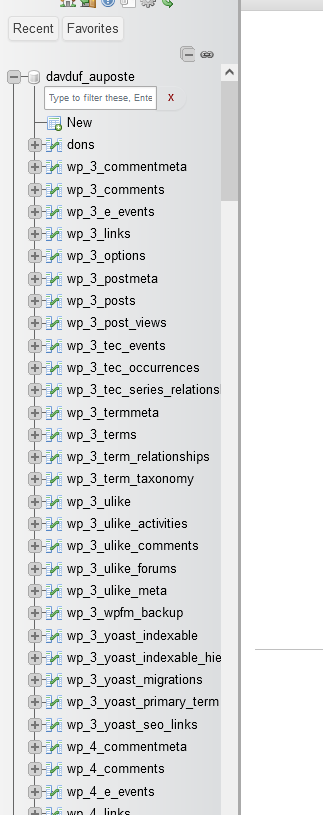
KeymasterIt looks like previously your site had id 2 -> https://diaboliquedesign.com/screenshots/4/screenshot_at_16-16-55.png and now site with id 2 disappeared, I see is 3 and 4 – https://diaboliquedesign.com/screenshots/4/screenshot_at_16-17-54.png
KeymasterPlease install WP phpMyAdmin plugin too
KeymasterOK, you said you removed multisite but I see it is still live
KeymasterDecember 19, 2023 at 16:07 in reply to: Not able to install GamiPress – BuddyPress integration, GamiPress – BuddyPressThese 3 plugins are already included in the main Gamipress plugin
KeymasterCheck it out – https://imgur.com/a/VX2uWvr
KeymasterI can’t access auposte.fr/wp-admin it redirects to the main page
KeymasterI need to do a multisite because I have already one theme on my website I need to keep and I’d love to use yours for my BuddyPress area
I am not sure what do you want to achieve, do you want to have 2 themes and the same website? In multisite you can have few websites on one WP installation but each website can have 1 theme, as far as I know different themes could be possible for user blogging only.
KeymasterDecember 14, 2023 at 07:46 in reply to: Not able to install GamiPress – BuddyPress integration, GamiPress – BuddyPressIt looks like since the new version of Gamipress these plugins are already included to the Gamipress
KeymasterI need these plugins:
I’m not sure if Buddypress is fully working with multisite, I suggest to install classic WP.
KeymasterYes, I have but I can’t add new plugin. The source of problem could be multisite enabled.
KeymasterI don’t have access to plugins
KeymasterNothing arrived, try to send it via this contact form -> https://themeforest.net/user/diabolique
-
This reply was modified 2 years ago by
DD.
KeymasterKeymasterI think the fastest way to find the source of poblem will be if you send me login credentials to your WP dashboard.
KeymasterIt looks like now buddypress, bbpress and wp ulike is included and no need for additional plugins.
KeymasterDecember 7, 2023 at 10:23 in reply to: Updating Ajax Search ProRemove old version of Ajax Search Pro then you should see suggestion of new version installation.
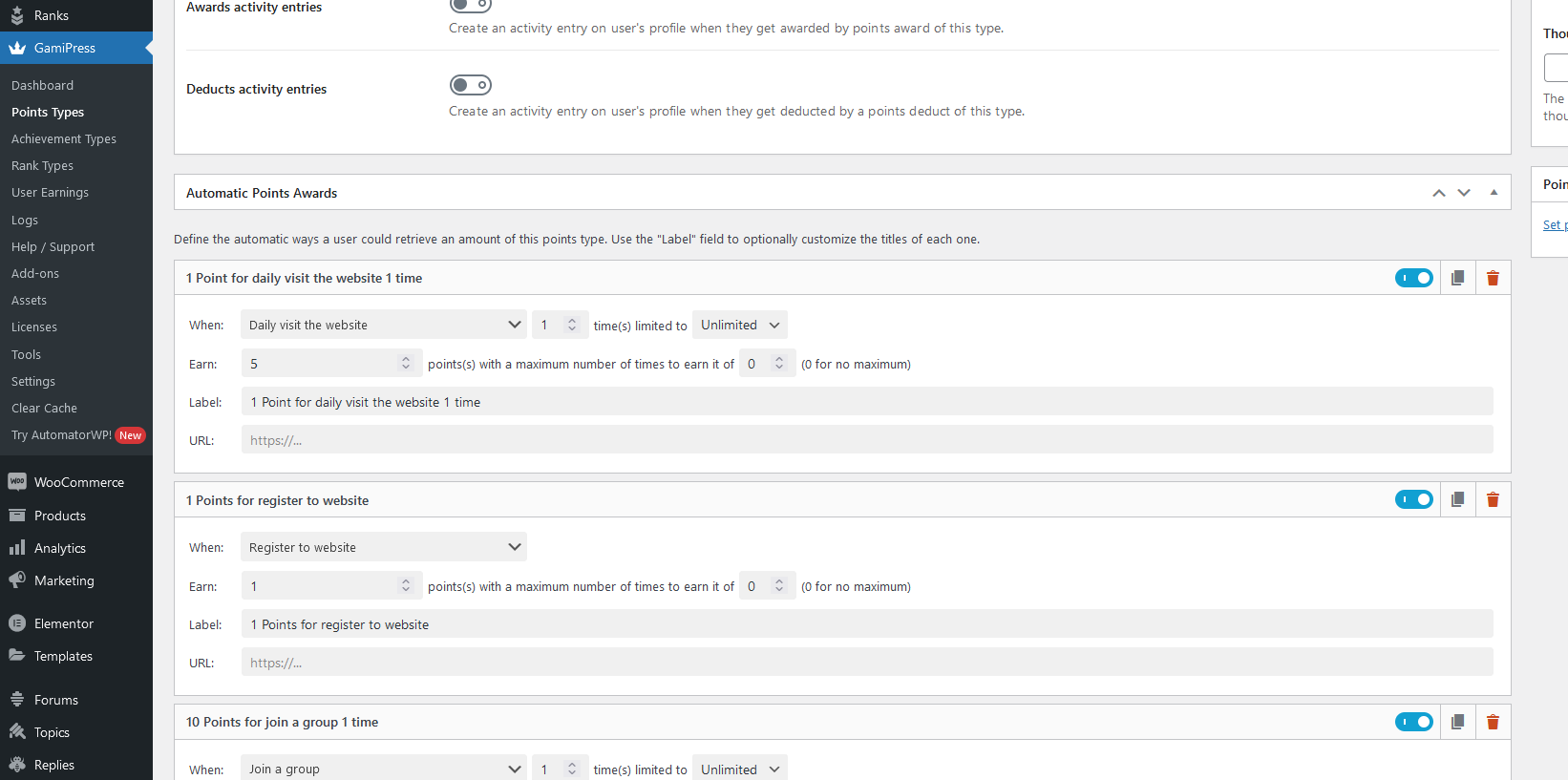
KeymasterWhen you to to point types then can you see some points awards imported? – https://diaboliquedesign.com/screenshots/4/screenshot_at_11-17-13.png
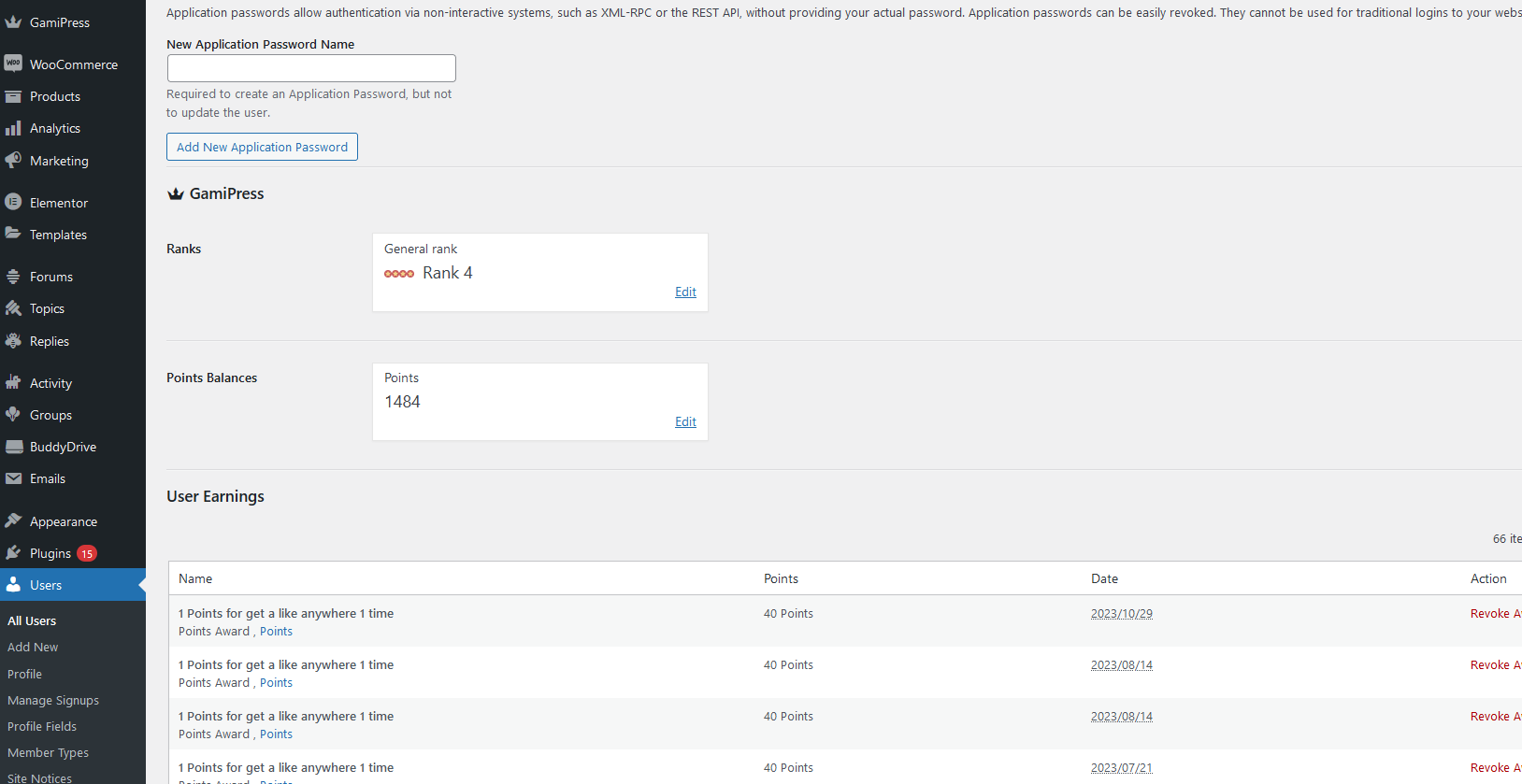
Also are there points awarded on the user profile? https://diaboliquedesign.com/screenshots/4/screenshot_at_11-18-38.pngKeymasterDecember 6, 2023 at 08:10 in reply to: Custom menuThis menu is here – wp-content/themes/onecommunity/template-parts/header-user-panel.php
Login button is in this folder – wp-content/themes/onecommunity/header.php
<?php if ( is_front_page() || is_page_template( array( 'frontpage-2.php', 'frontpage-page-builder.php' ) ) ) { ?> <a class="header-top-login header-top-login-jump login-popup-action"><?php esc_attr_e('Login', 'onecommunity'); ?></a> <?php } else { ?> <a class="header-top-login login-popup-action"><?php esc_attr_e('Login', 'onecommunity'); ?></a> <?php } ?>-
This reply was modified 2 years ago by
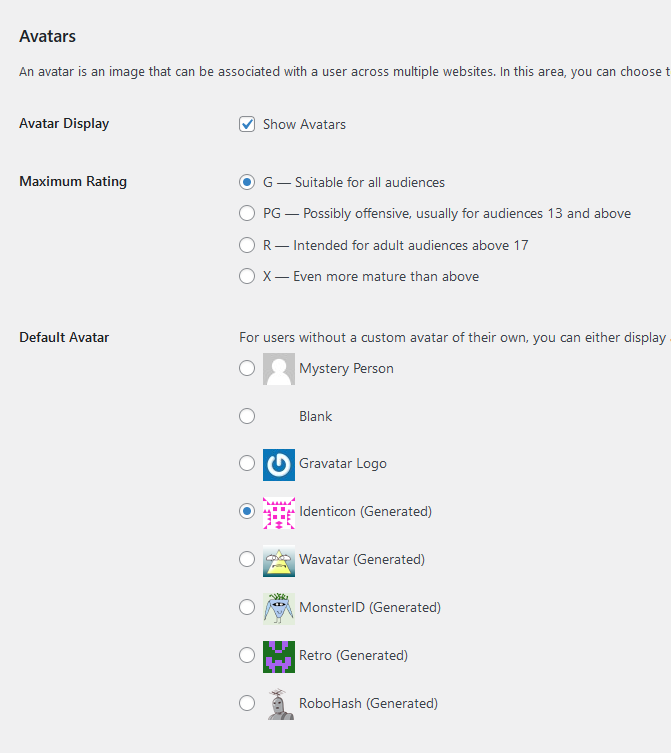
KeymasterDecember 6, 2023 at 08:03 in reply to: Picture user missingHello,
Go to WP Dashboard -> settings -> discussion and setup such settings – https://diaboliquedesign.com/screenshots/4/screenshot_at_09-03-07.png
-
This reply was modified 2 years ago by