-
DD
KeymasterJune 14, 2019 at 11:06 in reply to: Instalation errorsHello
1. Well, on the live demo is installed WP Super Cache and no problems here. You should try some other solutions.
2. What do you mean it loads more than one time?
KeymasterJune 14, 2019 at 00:06 in reply to: Instalation errors1. Also please check it out under a default WP theme.
KeymasterJune 13, 2019 at 20:33 in reply to: Instalation errors1. There can be conflict with some plugin, mostly by cache plugin, also when you get page looking like on the 2nd screenshot, please view the page code source under web browser and check out the URLs to styles. Also check the chmod of .htaccess – https://www.wpbeginner.com/wp-tutorials/how-to-fix-wordpress-posts-returning-404-error/
2. Please use following additional css
.shortcode-bp-groups-tabs-container .list-wrap ul { display: flex; flex-wrap: wrap; }KeymasterJune 12, 2019 at 09:20 in reply to: Translate ProblemWhat words in english you can’t translate? Make sure you translated the OneCommunity Shortcodes plugin too.
KeymasterJune 12, 2019 at 09:09 in reply to: Instalation errorsHello
1. It can be permalinks error, please go to settings -> prermalinks.
2. Can you show a screenshot?
3. Link is generated automatically on each page then you can share page on fb. This link is in the footer.php – http://www.facebook.com/…
KeymasterJune 11, 2019 at 08:47 in reply to: excerptsAlso you can try paste it
<?php echo get_the_excerpt(); ?>KeymasterJune 11, 2019 at 08:35 in reply to: excerptsHello
Please open the template-parts/blog-grid.php file and paste following code
<?php the_content(); ?>just after
<!-- blog-box-comments -->or
<a href="<?php the_permalink(); ?>" class="blog-thumb-title-anchor"><?php $thetitle = get_the_title(); $getlength = strlen($thetitle); $thelength = 57; echo mb_substr($thetitle, 0, $thelength, 'UTF-8'); if ($getlength > $thelength) echo "..."; ?></a>KeymasterJune 8, 2019 at 13:31 in reply to: Translate ProblemHello
What words you can’t translate?KeymasterForum tab should be removed if you disable a bbpress plugin.
The date is unfortunately still in English, although it is switched in the backend in German. Do you have any idea where I can change it?
As far as I know June in German is Juni so short version of this month Jun is OK.
Custom fields are not supported by wordpress since gutenberg release. There is something like events calendar – https://wp-events-plugin.com/documentation/calendars/
KeymasterOn your website it will be
.user-top-menu-container ul li:nth-of-type(6) { display:none; }KeymasterPlease use following css snippet
.user-top-menu-container ul li:nth-of-type(7) { display:none; }KeymasterJune 6, 2019 at 12:44 in reply to: Translation / PermalinksLike I said in other post, you translated this part with loco transtate while buddypress doesn’t support url transtations for slugs.
KeymasterTranslations for the drop down menu start with a small letter. You can find it when you go to the loco translate plugin.
Since I activated bbpress…it shows “Forum” again (that’s why i disabled the plugin) and I don’t know to hide it, ’cause we don’t need groups & forums.
You can disable it but you should remove onecommunity_recent_forum_topics shortcode on the sidebar.
KeymasterBut I did not translate the permalinks from the sidebar menu.
Do you mean s sidebar or this header menu? – http://diaboliquedesign.com/screenshots/1/screenshot_at_14-10-44.png
KeymasterJune 6, 2019 at 12:02 in reply to: Translation / PermalinksTheme is unusable for you because you don’t have any experience with a buddypress plugin. You will find the same problem with all social network themes because they are simply more complex than portfolio, blog themes. According to the TF rules the refund is not possible
https://themeforest.net/page/customer_refund_policyYou do not have sufficient expertise to use the item
I suggest you to spend more time with Buddypress because this is a very popular plugin and such knowledge will be useful in future. I hope you understand. Also if you send me login credentials then I can help you for free quickly.
KeymasterIt’s looks like a bbpress plugin is inactive but you still use bbpress shortcodes.
KeymasterJune 6, 2019 at 11:13 in reply to: Translation / PermalinksHello
Social network themes always will be more complicated than Avada because Avada just offers simple portfolio themes.
It looks like a buddypress issue (you can check it out under a default WP theme) which doesn’t allow to translate all slugs. In your case sandra/settings. To resolve it you shouldn’t translate the slugs visible on the drop down menu.
KeymasterJune 6, 2019 at 11:05 in reply to: Groups cover images is not workingHello
Cover images are possible for youzer version of theme. As you can see on the live demo, there is no cover images because there is simply no space for such background images.
KeymasterYou can simply use a child theme, it’s shipped with theme.
Another problem, which I forgot to mention yesterday. Newly created pages as well as old ones (“about us” and “activities” for example) show only the preloader, not the content. What is wrong?
Probably there is some groups widget. You can enable a debug mode and view the page source code, there should be an error at the bottom.
KeymasterOpen the wp-content/themes/onecommunity/buddypress/members/single/profile-sidebar.php file and remove following part of code https://pastebin.com/xA2H2sxH
KeymasterMay 29, 2019 at 12:51 in reply to: Loco TranslateHello
Did you install turkish translation of buddypress? https://codex.buddypress.org/translations/turkish-turkce-tr_tr/
KeymasterMay 28, 2019 at 22:50 in reply to: Demo Upload LimitAnyway just try to increase upload limit and use all in one migration tool.
KeymasterMay 28, 2019 at 21:59 in reply to: Demo Upload LimitYes, it’s included. Try to unzip demo content and upload the wp-content/uploads folder manually.
KeymasterMay 24, 2019 at 12:06 in reply to: Demo Upload LimitInstall this demo content – http://diaboliquedesign.com/demo/onecommunity-new/wpclone_backup_swGjZQSUcb.zip using this plugin – https://wordpress.org/plugins/wp-clone-by-wp-academy/
KeymasterMay 24, 2019 at 09:35 in reply to: Demo Upload LimitYou should ask your horting provider for memory, upload and post limit increase.
KeymasterMay 24, 2019 at 08:45 in reply to: Demo Upload LimitHello
You can just increase the memory limit. Open the .htaccess file in the root of your WP installation and paste following code at the very bottom
php_value upload_max_filesize 512M php_value post_max_size 512M php_value memory_limit 512MKeymasterMay 21, 2019 at 12:02 in reply to: THEME IS NOT RESPONSIVEIt’s caused by this broken image – https://screenshots.firefox.com/OuR7S12pzthX4w8Q/www.bloginresina.it
KeymasterMay 20, 2019 at 18:05 in reply to: THEME IS NOT RESPONSIVEarticle { /* These are technically the same, but use both */ overflow-wrap: break-word; word-wrap: break-word; -ms-word-break: break-all; /* This is the dangerous one in WebKit, as it breaks things wherever */ word-break: break-all; /* Instead use this non-standard one: */ word-break: break-word; /* Adds a hyphen where the word breaks, if supported (No Blink) */ -ms-hyphens: auto; -moz-hyphens: auto; -webkit-hyphens: auto; hyphens: auto; }I already added it on your website
KeymasterMay 20, 2019 at 11:35 in reply to: THEME IS NOT RESPONSIVEIt was caused by very long url, I have added code snippet under customizer and it looks fine now.
Abother thing i would like to use visual composer for editing posts and not the classic editor.
Go to WPBakery Page Builder -> Role manager -> Post types -> Custom and check the post. Now you can create posts using this page builder.
KeymasterMay 15, 2019 at 07:10 in reply to: THEME IS NOT RESPONSIVEIf you interested I can send you a slider revolution plugin so you could use it instead of layer slider, it was used by 2.x version theme.
KeymasterMay 14, 2019 at 11:51 in reply to: THEME IS NOT RESPONSIVEUse following css
@media screen and (max-width:1400px) { #header-menu-container { display: block; } #mobile-nav { display:none; } } @media screen and (max-width:1024px) { #header-menu-container { display: none; } #mobile-nav { display:block; } }KeymasterHere is a fix. Go to Ajax Search Pro -> Maintencance -> Reset all options to default. Install custom style – http://diaboliquedesign.com/demo/onecommunity-new/Help/#search
KeymasterMay 14, 2019 at 10:14 in reply to: THEME IS NOT RESPONSIVEI have duplicated your frontpage for testing and it looks like the source of problem is a layer slider plugin, when I removed this slider from the frontpage then the page is responsive – https://www.bloginresina.it/test/
Can you send a support request to the author of layer slider plugin? Does this plugin need some wrapper because while resizing the window the width of slider is always fixed.
KeymasterMay 13, 2019 at 14:29 in reply to: THEME IS NOT RESPONSIVEYou can send me WP login credentials via contact form so I will take a look on it.
KeymasterMay 13, 2019 at 14:23 in reply to: THEME IS NOT RESPONSIVEThere is still no “wrapper” class – https://imgur.com/a/sCq4Hzj
Probably you entered it in the wrong place or the page still is cached.KeymasterI can duplicate your problem if a debug mode is enabled, warning isn’t generated by theme but by the ajax-search-pro, I have asked the plugin’s author for the problem solution and I’m waiting for response.
This css snippet will resolve comment likes problem:
.comment-content .wpulike { left:130px; }KeymasterMay 13, 2019 at 10:06 in reply to: Shortcode IssueHello
Probably you deactivated the CommunityJunction Shortcodes plugin, anyway it works fine on your website now.
KeymasterHello
It seems like this warning appears when you use older PHP version than 7.
There are 2 solutions:
1. Upgrade php version to 7.x
2. Hide warnings – https://www.greengeeks.com/tutorials/article/disable-wordpress-php-error-messages/You have to setup all settings just like on these screenshots – http://diaboliquedesign.com/demo/onecommunity-new/Help/#ulike
KeymasterMay 13, 2019 at 09:33 in reply to: THEME IS NOT RESPONSIVEHello
You didn’t put the wrapper class into the each row.
From documentation – http://diaboliquedesign.com/demo/onecommunity-new/Help/#wpbakery
While creating new row you should put additional css class called wrapper, it will center your content.
This wrapper class will reduce the width of rows on small screens.
Also in my opinion the Elementor plugin is easier for novice to build a responsive layout.
KeymasterMay 9, 2019 at 11:12 in reply to: Elementor not open FrontPageIt’s a special widget area available under appearance -> widgets
KeymasterMay 8, 2019 at 09:38 in reply to: Elementor not open FrontPagePaste following css snipped under appearance -> customise -> additional css
@media screen and (max-width:620px) { #mobile-nav { display:none; } }KeymasterMay 7, 2019 at 17:12 in reply to: Elementor not open FrontPageAs far as I know such page builder for buddypress pages doesn’t exist yet.
KeymasterMay 7, 2019 at 15:34 in reply to: Elementor not open FrontPageThere is no way to customize buddypress pages using elementor, you’re exprecting too much from this page builder.
KeymasterMay 7, 2019 at 10:37 in reply to: Elementor not open FrontPagehttps://screenshots.firefox.com/oW9CBWRetjrACcae/diaboliquedesign.com
If you installed demo content then you should edit Home Elementor page, not Home page (it isn’t customisable page).
KeymasterMay 7, 2019 at 10:36 in reply to: Elementor not open FrontPageAre you sure you selected Frontpage Page Builder page template? Not Frontpage 1.
KeymasterYou can manage it under users -> profile fields
KeymasterMay 7, 2019 at 10:08 in reply to: Change activate page text contentYou can change it with the loco translate plugin – http://diaboliquedesign.com/demo/communityjunction/Help/#translate
KeymasterMay 7, 2019 at 10:07 in reply to: Elementor not open FrontPageI don’t see the difference on default WP theme so it doesn’t look like a theme issue.
KeymasterYou should go to appearance -> install plugins and install all plugins from the list. You should follow theme doc too – http://diaboliquedesign.com/demo/communityjunction/Help/
KeymasterThey will be visible if you activate more plugins like Event Manager, WooCommerce.
KeymasterMay 3, 2019 at 09:20 in reply to: 500 Internal Server ErrorHello
I can’t dupicate your problem – https://imgur.com/a/DK24eCg
Please make sure you enabled php 7 instead of php 5 and all required plugins, also is there any errors on the website outside the wp dashboard? Please check out the customizer under default WP theme.KeymasterHello
I can’t dupicate your problem – https://imgur.com/a/DK24eCg
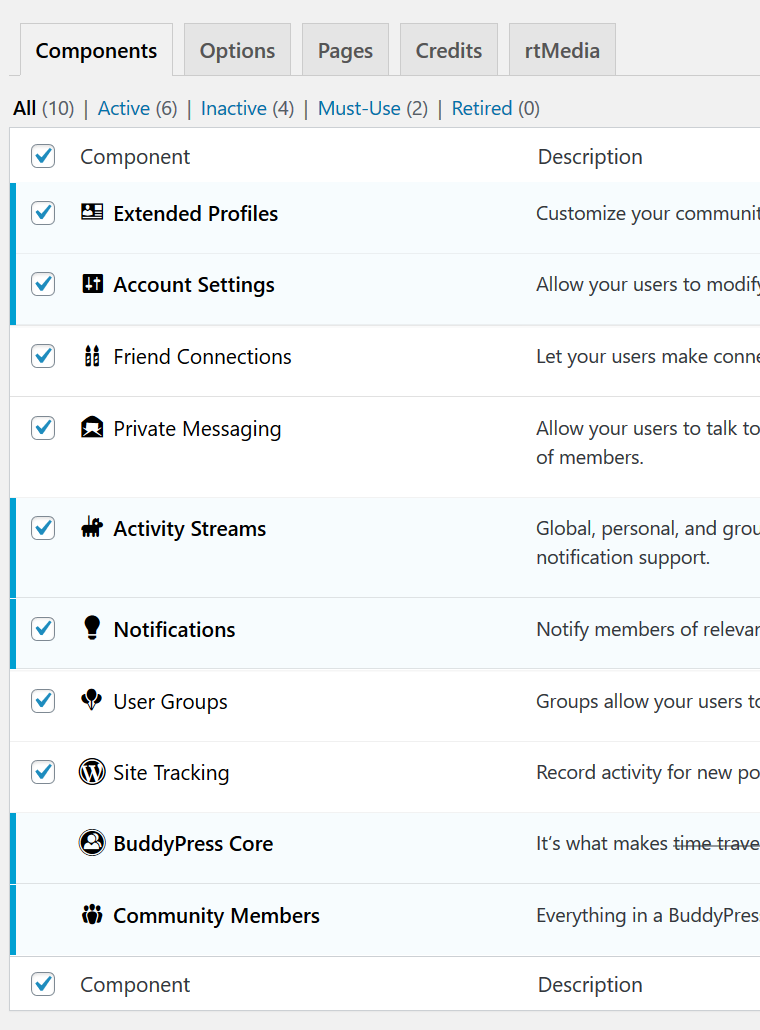
Please make sure you enabled php 7 instead of php 5. Make sure you enabled all required plugins, there is no errors on website outside the wp dashboard. Alsoplease check out the customizer under default WP theme.KeymasterMay 2, 2019 at 08:30 in reply to: Nothing loads after loginYou didn’t enable messaging component
http://diaboliquedesign.com/demo/onecommunity-new/Help/assets/components.png
There are 2 solutions:
1. Enable it under settings -> buddypress2. If you want to have it enabled then open the header.php file and remove following part of code
https://pastebin.com/XEZPRyxDKeymasterApril 29, 2019 at 08:16 in reply to: Nothing loads after loginYour website looks fine – https://screenshots.firefox.com/wN5OHl5lze7X559y/rgf.59b.myftpupload.com
You can copy Slider Revolution from 2.0 version and install it on 3.0.
I don’t see any customisations on your website so migration will be easier than you think.
KeymasterApril 24, 2019 at 10:07 in reply to: Forum Installation V 3.1 IssueYou’re right, you should select a default template. I updated the online doc – http://diaboliquedesign.com/demo/onecommunity-new/Help/#forums
KeymasterApril 21, 2019 at 21:48 in reply to: Nothing loads after loginIn other words, I’m willing to turn off any plugins that are causing issues, just to test the core functions of the site. What do you advise I do at this juncture?
Open functions.php and remove following code
remove_action( 'woocommerce_before_main_content', 'woocommerce_output_content_wrapper', 10);
remove_action( 'woocommerce_after_main_content', 'woocommerce_output_content_wrapper_end', 10);
add_action('woocommerce_before_main_content', create_function('', 'echo "<div id=\"content\">";'), 10);
add_action('woocommerce_after_main_content', create_function('', 'echo "</div>";'), 10);
remove_action( 'woocommerce_before_main_content',
    'woocommerce_breadcrumb', 20, 0);
Also make sure you enabled all BP components under settings -> buddypress – http://diaboliquedesign.com/demo/onecommunity-new/Help/assets/components.png
If it won’t help then I have to see your website’s URL.I see an update has been released… if this update address my concerns I can rebuild
This is an update for 3.x version which has refreshed design and code – http://diaboliquedesign.com/demo/onecommunity-new/
You are still using old 2.x version. You can upgrade it but keep in your mind it wasn’t tested with a learnpress plugin.KeymasterApril 21, 2019 at 17:32 in reply to: Nothing loads after loginDo you use woocommerce or do you plan to use woocommerce?
KeymasterApril 21, 2019 at 09:40 in reply to: Nothing loads after loginIt looks like you didn’t enable all buddypress components – http://diaboliquedesign.com/demo/onecommunity-new/Help/assets/components.png
There is a hidden error, which you can show enabling debug mode, open wp-config.php and make following setting
define( 'WP_DEBUG', true );KeymasterOne thing, I see that the users wants a app for the website, this is possible? like the notification of buddypress arrives like notification in the mobile app…
How could I do that? any idea?
Well, you can try some PWA plugin, but I am afraid it’s not so simple
Another thing, It is possible that when the users create their profile arrives the email immediately in their email, I see that the email arrive one day after the registration and in the spam mail.
Probably the IP address of your server is blacklisted. You can check it here – http://whatismyipaddress.com/blacklist-check There are 2 solutions: buy unique IP address or use some external e-mail like Gmail, you can do it using this plugin – https://wordpress.org/plugins/wp-mail-smtp/
KeymasterI didn’t lunch a shortcodes updater, anyway it looks fine now. I still analyzing the streaming activity problem, it looks like a database problem because nobody else reported such problem. Probably you have to remove a table with activities and create this table once again. Anyway I need a little more time to find the source of this problem.
KeymasterPlease install the 3.1 version of theme, it contains all fixes.
Don’t forget to change e-mail of you website. Also you can go to Settings -> Reading and disable “Discourage search engines from indexing this site”.
Also take a look at the Header Footer Code Manager plugin where you can change google analytics code and enable registration.KeymasterYou can change it in the
plugins/onecommunity-shortcodes/onecommunity-shortcodes.php<?php echo home_url(); ?>/recovery <?php echo home_url(); ?>/registerKeymasterOk perfect, I see the leaderboard now, what did you do?
There was a bug, shortcode didn’t work if there was a different tables prefix than default wp_
Also I see that the backgrounds colors of the blocks of the slider have changed to default colors again, I just changed in Style.css, In this operation ok?
Please keep your custom style under appearance -> customizer -> additional css
Also, this theme is compatible with this add on ? https://gamipress.com/add-ons/gamipress-referrals/
Yes
KeymasterApril 18, 2019 at 12:24 in reply to: group pages not responsive!What page exactly? I made some tests on your website and it seems like it happens because you didn’t assign any featured image for example here – https://farmersunion.co.uk/the-benefits-of-milk/
KeymasterI fixed all problems on your website. There is only a weird problem with the latest groups activities load, I will take a look on it later.
KeymasterApril 17, 2019 at 11:06 in reply to: group pages not responsive!Please put the following css snippet into the appearance -> customize -> additional css
@media screen and (max-width:590px) { #main, .directory.groups #container, .page-template-page2-php #container, #header-container, .registration #container, #header-bar-container, #footer-container, .directory.groups #main, div#item-header, #single-group-container, #single-member-container, #footer-container, #header-bar-container, #header-container, #header-left, #header-right, #bar-right, #header-bar-container, #content, .single-item.groups #item-header-container #item-header, .group-create #container { width:300px!important; } #item-header-container #item-header { margin-left:0px!important; } }KeymasterLeaderboard doesn’t work because probably you used a different name for points under Gamipress -> Points Types https://imgur.com/a/zwXRURa
If you used different name then you should edit shortcode, edit
name="points"andtype="_gamipress_points_points", change this parttype="_gamipress_points_[change]"If you enable a debug mode then it will be easier to find the source of problem.
KeymasterAnyway please send me login credentials via contact form so I will take a look on it https://themeforest.net/user/diabolique
KeymasterWith #loader-wrapper { background:#cccccc; } in the css customizer just change the background, I want to change the colors of the circles.
Generate animation (ripple) on this website https://loading.io/ and replace this image wp-content/themes/onecommunity/img/loader.gif
I try to put this css #shortcode-login-submit:hover { background:#cccccc!important; } and nothing happen, I have deleted the browser cache and the cache of the website and nothing happens.
Following code will work:
.shortcode-login #shortcode-login-submit:hover {background:#cccccc!important; }Also I want to show the leaderboard of the ranking on the homepage adding this to a section of visual builder [onecommunity-gamipress-leaderboard limit=”7″ name=”points” layout=”small” type=”_gamipress_points_points”], and nothing is showing…
You should put it into Text Block under text mode
https://screenshots.firefox.com/p60cr4KxuGcNoOLe/localhostKeymasterApril 16, 2019 at 16:29 in reply to: group pages not responsive!Yes, there is a fix but I need a little more time.