-
DD
KeymasterAugust 11, 2019 at 11:13 in reply to: Post author oxTry this plugin – https://wordpress.org/plugins/simple-author-box/
KeymasterYou should use this version of migration tool with unlimited upload – http://diaboliquedesign.com/all-in-one-wp-migration.6.68.zip
Theme options are available under appearance -> customize
KeymasterHello
You should disable the Header Footer Code Manager plugin.
KeymasterYou should select the Frontpage Page Builder page template.
KeymasterKeymasterAugust 3, 2019 at 12:28 in reply to: Youzer security issueHello
You can try such plugin – https://wordpress.org/plugins/wp-approve-user/
KeymasterAugust 3, 2019 at 12:24 in reply to: ERROR GROUP ALIGNPut following css under appearance -> customize -> additional css
.widget_bp_groups_widget #groups-list li { width:100%!important; }KeymasterAnimation works fine now.
Just increase 57 number, for example put 100 instead of 57.
KeymasterAugust 3, 2019 at 10:45 in reply to: Translate NAV MEMBER MENUI’m still waiting for response. How did you resolve it?
KeymasterHello
1. You should open the wp-content/plugins/onecommunity-shortcodes/inc/blog.php file and increase 57 parameter in 2 places.
2. Can you send me login credentials to your WP dashboard so I will make few tests. You can send it via contact form – https://themeforest.net/user/diabolique
KeymasterAugust 1, 2019 at 11:50 in reply to: wpbakery plugin missingHello
Please open the functions.php file (ROOT of theme folder), remove everything and paste it – https://pastebin.com/raw/df7Xsncd
Since 3.3.3 version theme uses Elementor only.
KeymasterAugust 1, 2019 at 08:57 in reply to: Post author oxGo to appearance -> customize -> additional css and paste following css:
.single-post main#content aside#left, .blog-post aside#left, .single-event aside#left { display:none; } .single-post main#content article, .single-event main#content article, main#content .blog-post article { float: left; width: 100%; }KeymasterAugust 1, 2019 at 08:45 in reply to: Translate NAV MEMBER MENUHello
Yes, I can duplicate your problem. I reported it to the Youzer dev and I’m waiting for response.
KeymasterHello
I think you should read the whole documentation of this plugin first – https://www.paidmembershipspro.com/documentation/
KeymasterJuly 31, 2019 at 11:29 in reply to: Registration disabled?Disable the Header Footer Code Manager plugin, it disabling many actions so potential clients won’t make mess on the live demo. BTW you can put google analytics using this plugin.
KeymasterJuly 31, 2019 at 11:27 in reply to: SSL ERROR – IMAGE SEARCHHello
Please check it out – https://themeforest.net/item/onecommunity-buddypress-theme/3713046/faqs/41339
KeymasterJuly 31, 2019 at 11:08 in reply to: ERROR WRAPPER HOME FRONT PAGEHello
I can’t find this text, anyway the page looks fine – http://diaboliquedesign.com/screenshots/1/screenshot_at_13-07-35.png
Also when you want to post some code then please post it here first – https://pastebin.com/
and then post link to code here.KeymasterJuly 30, 2019 at 15:26 in reply to: RTMedia Error DemoCan you downgrade it to php 7.1? The live demo is on 7.1
Also there is no longer support since 3.3.3 for WPBakery page builder, there will be Elementor supported only.
KeymasterJuly 30, 2019 at 10:04 in reply to: RTMedia Error DemoDoes it work under a default WP theme? What PHP version is on your server. Many plugins have problem with 7.3.
KeymasterJuly 30, 2019 at 09:50 in reply to: Registration DisabledHello
Remowe the Header Footer Code Manager plugin.
KeymasterJuly 30, 2019 at 09:49 in reply to: PortfolioYou could use rtmedia plugin, there is many option to output the content using shortcodes -> https://rtmedia.io/docs/features/gallery/
… or use something like this – https://wordpress.org/plugins/bp-portfolio/
only how can a normal user access the creation of such an entity?
It can be done this way – https://thimpress.com/edit-your-course-from-frontend-with-learnpress-frontend-editor-add-on/
KeymasterJuly 30, 2019 at 09:42 in reply to: Change user descriptionHello
Just post activity on your profile – http://diaboliquedesign.com/screenshots/1/screenshot_at_11-41-47.png
KeymasterJuly 29, 2019 at 17:32 in reply to: Customization and fix errorsHello
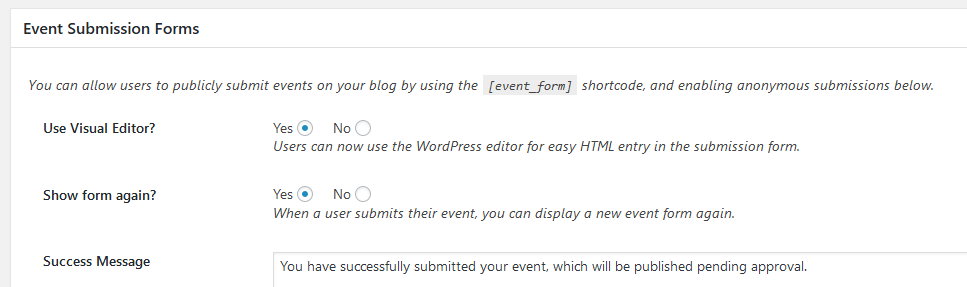
It looks like this front end way of event publishing is possible – http://diaboliquedesign.com/screenshots/1/screenshot_at_19-31-31.png
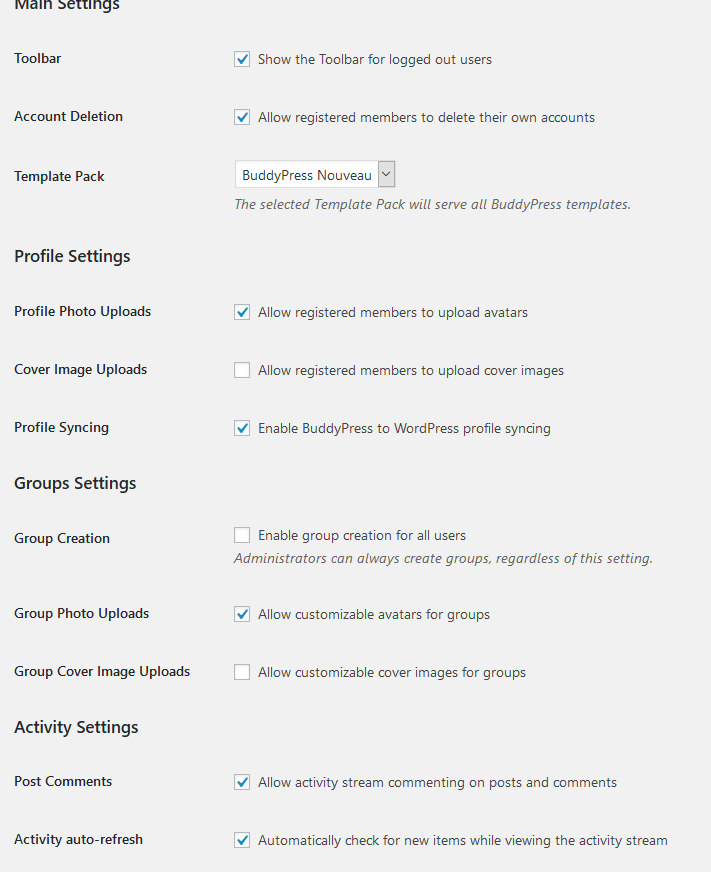
You should enable group creation under settings -> buddypres
http://diaboliquedesign.com/screenshots/1/screenshot_at_19-25-18.pngKeymasterHello
You should follow all following steps
VIII. How to install WP ULike plugin?
http://diaboliquedesign.com/demo/onecommunity-new/Help/#ulike
KeymasterHello
You should disable cover images under settings -> buddypress
http://diaboliquedesign.com/screenshots/1/screenshot_at_17-30-42.png
KeymasterThere should be following code
match(/\d+/g)instead of
match(/\d/g)KeymasterJuly 25, 2019 at 19:41 in reply to: Youzer Edition ShortcodesI can’t duplicate your problem – http://diaboliquedesign.com/screenshots/1/screenshot_at_21-41-05.png
It can be added by some security plugin.
KeymasterJuly 25, 2019 at 15:28 in reply to: Youzer Edition ShortcodesI will take a look on it.
KeymasterJuly 25, 2019 at 14:28 in reply to: Demo importHello
Instructions are in the the Demo Content folder.
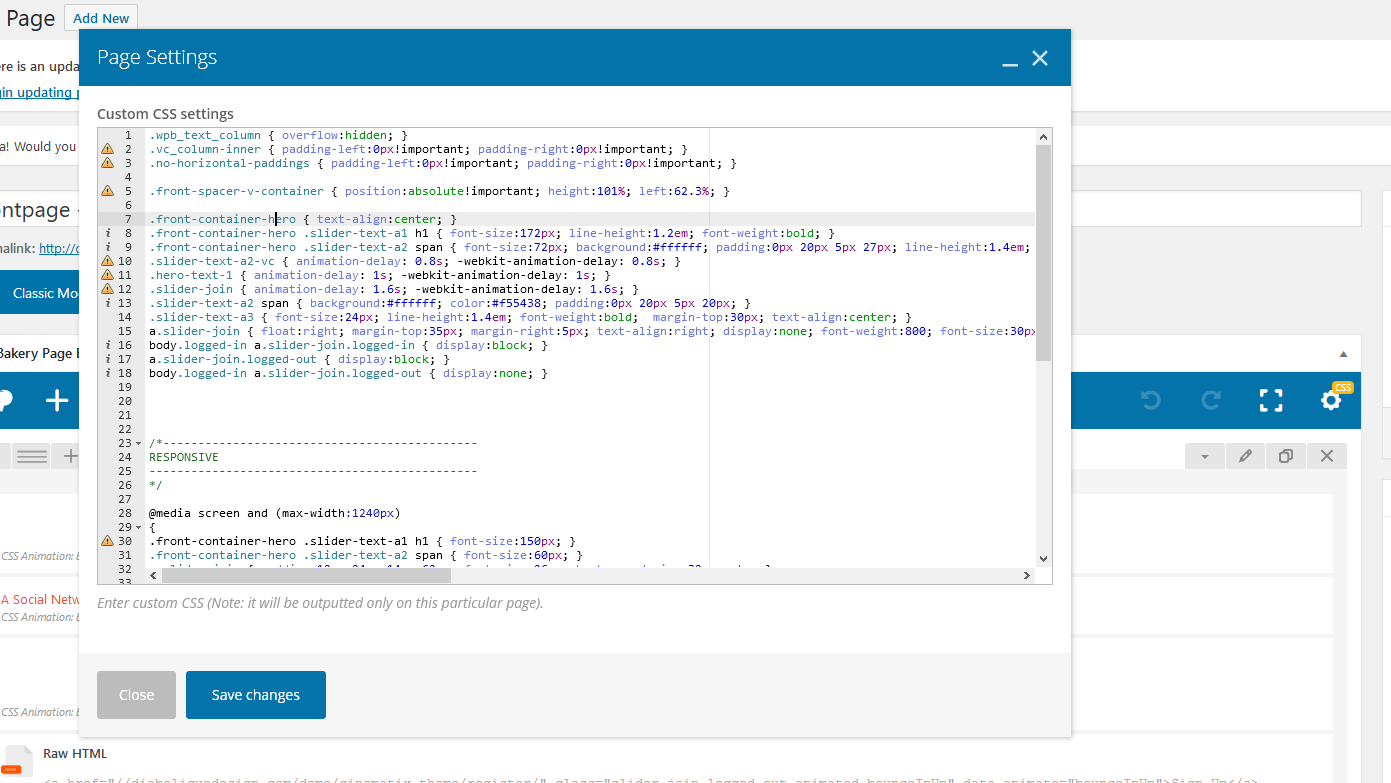
KeymasterJuly 25, 2019 at 14:05 in reply to: translations and linksYou should clock on the css settings (yellow button visible on the screenshot) and reduce font-size:172px;
http://diaboliquedesign.com/screenshots/1/screenshot_at_16-04-57.png
KeymasterJuly 23, 2019 at 20:17 in reply to: Customization and fix errorsHello
1. Login popup is disabled on the frontpage because there is already one login form (you can’t use 2 login forms on 1 page), you can enable login popup window under appearance -> customize -> general
2. Disable the Header Footer Code Manager plugin.
3. http://diaboliquedesign.com/demo/onecommunity-new/Help/#profile-fields
4. Where the others camps is on your website?
5. Unfortunately the support doesn’t cover such customizations. Anyway the whole style is in the wp-content/plugins/onecommunity-shortcodes/shortcodes.css -> Shortcode Events
KeymasterI just fixed it on your website.
FIX in functions.php (root of theme):
Added
var notificationsNewCount = notificationsNewCount.match(/\d/g);After
var notificationsNewCount = this.response;Added
var messagessNewCount = messagessNewCount.match(/\d/g);After
var messagessNewCount = this.response;KeymasterI think it would be great if you send me login credentials to your WP dashboard via contact form -> https://themeforest.net/user/diabolique so I will make few tests.
KeymasterHello
You should follow this chapter -> http://diaboliquedesign.com/demo/onecommunity-new/Help/#translate
KeymasterHello
Please open the functions.php (root of theme) and paste following code
console.log('Variable returns');
console.log(messagessNewCount);
just before
messagessCountContainer.classList.add('no-' + messagessNewCount + '');… and after heartbeat tick tell me what console displayed.
KeymasterKeymasterJuly 15, 2019 at 21:32 in reply to: tag problemI just fixed it. Hewre is a result -> http://diaboliquedesign.com/demo/onecommunity-new/tag/featured/
Here are changelogs -> http://diaboliquedesign.com/demo/onecommunity-new/changelogs.txt
Afer you will receive an e-mail notification about update available then you should download new version of theme end replace whole theme or modified files only.
KeymasterKeymasterJuly 15, 2019 at 09:26 in reply to: translations and linksPlease send me wp dashboard’s login credentials via contact form so I will fix it – https://themeforest.net/user/diabolique
KeymasterJuly 15, 2019 at 09:21 in reply to: translations and linksI updated instructions – http://diaboliquedesign.com/bundled-plugins/cinematix-208572.php
KeymasterHello
Login popup is blocked on the frontpage, because usually (like on the live demo) there is already login form on this page. Appearance -> Customize -> General -> and check the Enable login popup on the frontpage.
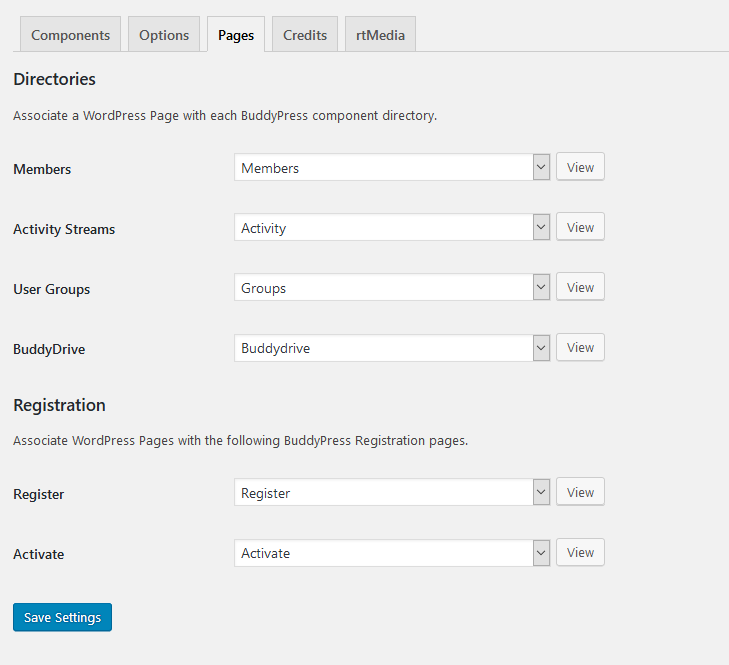
You should assign register page under buddypress settings here – http://diaboliquedesign.com/screenshots/1/screenshot_at_10-36-55.png
Link of the Register button can be changed in header.php here<?php echo home_url(); ?>/registeroh my…got an issue with the Login agaiin. After succesfull log in i am not permited to access the backend. If i click at the Dashboard a new Login Form appears and i need log me in there. Any ideas?
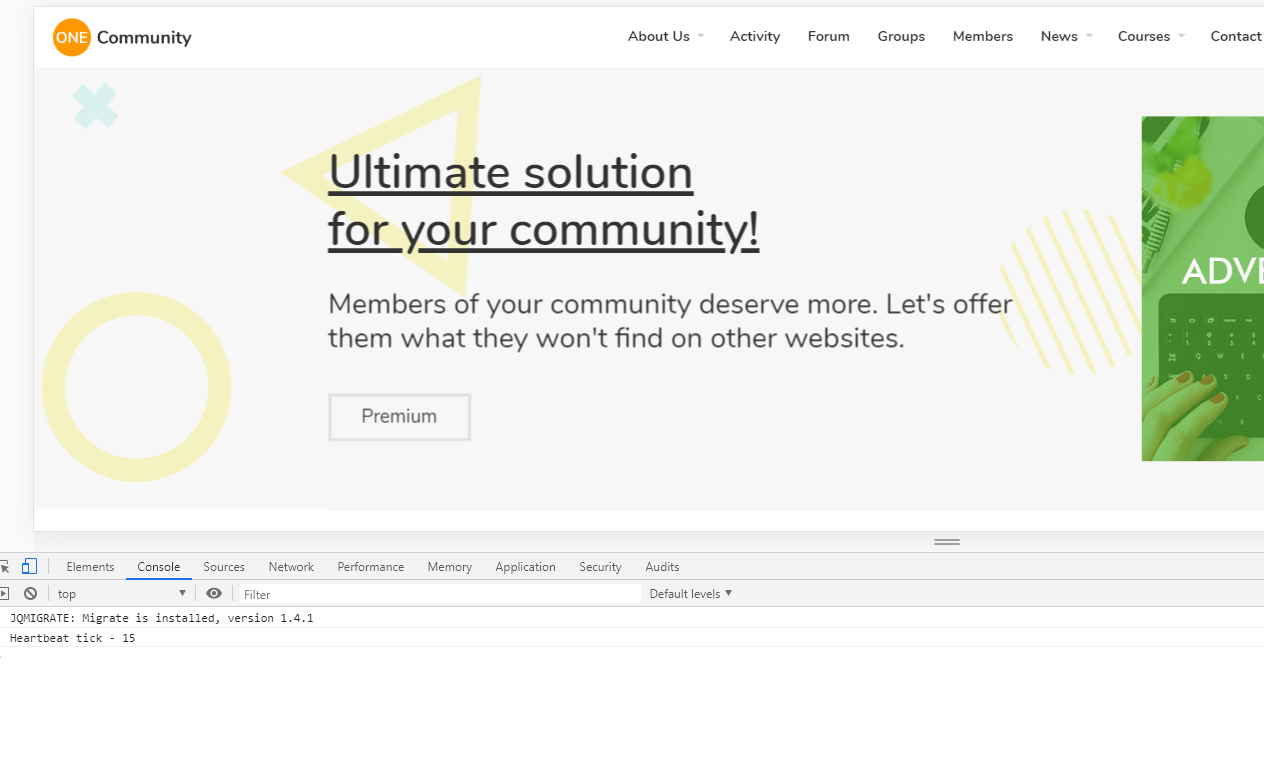
There could be some javascript error caused by some plugin. You can check it out in console -> http://diaboliquedesign.com/screenshots/1/screenshot_at_10-41-16.png
KeymasterJuly 9, 2019 at 09:21 in reply to: translations and linksThis part can be changed with page builder (Page: Frontpage – Visual Composer) – http://diaboliquedesign.com/screenshots/1/screenshot_at_11-14-52.png
… but first you should install the latest version of WPBakery page builder which you can get here – http://diaboliquedesign.com/bundled-plugins/cinematix-208572.php
KeymasterJuly 8, 2019 at 09:18 in reply to: translations and linksYou can easy translate your website using – https://wordpress.org/plugins/loco-translate
KeymasterJuly 6, 2019 at 14:06 in reply to: Cache IssueHere is a quick fix when a learnpress plugin is disabled, open page.php in the root of theme, remove everything and paste it https://pastebin.com/raw/8WMfwT5f
KeymasterJuly 6, 2019 at 13:55 in reply to: Cache IssueTest it under a default WP theme.
KeymasterJuly 6, 2019 at 13:32 in reply to: Cache IssueTry to disable all plugins except the cache plugin and test it out.
KeymasterJuly 6, 2019 at 12:56 in reply to: Cache IssueTry do go to settings -> permalinks and resave it. Do you have the same problem when a default WP theme is active?
KeymasterJuly 6, 2019 at 10:50 in reply to: Cache IssueWhat cache plugin do you use and what pages have this issue? Actually the live demo is cached with WP Super Cache and no problems here.
KeymasterJuly 6, 2019 at 08:52 in reply to: Attach file in pageYou can add it this way – https://www.wpmadesimple.org/supplementary-guides/adding-pdf-documents/
KeymasterJuly 5, 2019 at 16:45 in reply to: fatal error-urgentYou should add subtitle to each parent menu item.
KeymasterKeymasterJune 28, 2019 at 10:14 in reply to: fatal error-urgentHere is a working version with youzer – http://diaboliquedesign.com/demo/wildcommunity-youzer/wildcommunity-youzer-743365.zip
KeymasterJune 28, 2019 at 08:53 in reply to: fatal error-urgentI will send you today a special version working with Youzer.
KeymasterJune 27, 2019 at 17:04 in reply to: fatal error-urgentThere is some hidden error – https://shineworldwide.in/members/shineadmin/
which you can view enabling a debug mode in wp-config.phpKeymasterJune 27, 2019 at 17:02 in reply to: fatal error-urgentYou have display_errors On, it should be off. I can help you for free. If you want to use youzer then you should remove all buddypress releted folders and files from theme.
KeymasterJune 27, 2019 at 13:47 in reply to: fatal error-urgentMake sure you enabled all buddypress components under settings -> buddypress
http://wwwild.net/demo/wildcommunity/Help/assets/components.png
Open the .htaccess file (root of wp installation) and paste following code at the very bottom:
php_flag display_startup_errors off
php_flag display_errors off
then create file called phpinfo.php with following code
<?php

// Show all information, defaults to INFO_ALL
phpinfo();

// Show just the module information.
// phpinfo(8) yields identical results.
phpinfo(INFO_MODULES);

?>
…open phpinfo.php file in web browser (www.yourdomain.com/phpinfo.php) and make sure display_errors is off. Also make sure you are using php 7.x
KeymasterJune 27, 2019 at 09:32 in reply to: fatal error-urgentPlease go to settings -> budypress -> options and make sure you selected Template Pack: BuddyPress Legacy
KeymasterIf you use elementor then you can customize it editing frontpage with elementor. If you use a static page then open the frontpage-1.php file in the root of WP and edit 4TH ROW STARTS -> right column
KeymasterYou should enable all components under Settings → Buddypress
http://diaboliquedesign.com/demo/cinematix-theme/Help/assets/components.jpg
KeymasterJune 25, 2019 at 13:44 in reply to: Instalation errorsI just need URL, you can send it via contact form – https://themeforest.net/author_dashboard
KeymasterJune 25, 2019 at 13:02 in reply to: Instalation errors1. I can’t duplicate your problem, also nobody else reported such problem. When I see the website then I will be able to help.
2. It’s here wp-content\themes\onecommunity\buddypress\members\single\groups.php
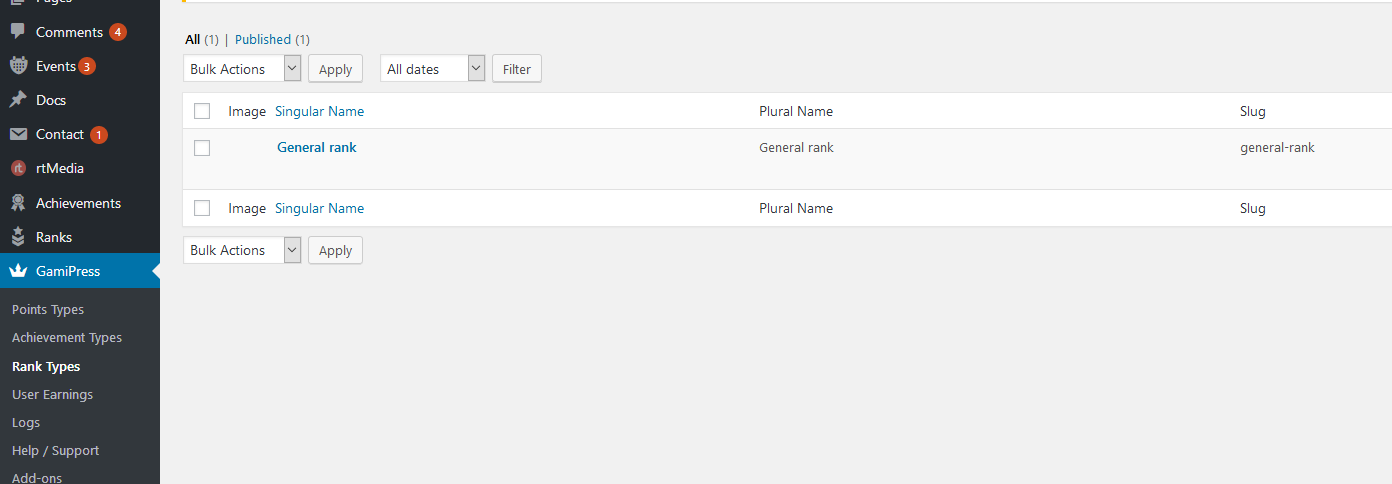
there should be type=”general-rank”, if it’s here then you should go to wp dashboard -> gamipress -> rank types and create such rank – http://diaboliquedesign.com/screenshots/1/screenshot_at_15-02-01.png
KeymasterJune 25, 2019 at 08:33 in reply to: Instalation errors1. I testes long titles on the live demo and no problem here – http://diaboliquedesign.com/screenshots/1/screenshot_at_10-28-55.png
You can recopy whole stylesheet from the live demo – http://diaboliquedesign.com/demo/onecommunity-new/wp-content/plugins/onecommunity-shortcodes/shortcodes.css2. You should add
type=""
attribute – https://gamipress.com/docs/shortcodes/gamipress_user_rank/
for example[gamipress_user_rank type="level" prev_rank="yes" current_rank="yes" next_rank="yes" current_user="yes" columns="3"]KeymasterJune 17, 2019 at 21:34 in reply to: bbpress page-titleHello
It’s the bbpress.php file in the root of theme
<h1 class="page-title"><?php $thetitle = get_the_title(); $getlength = strlen($thetitle); $thelength = 55; echo substr($thetitle, 0, $thelength); if ($getlength > $thelength) echo "..."; ?></h1>KeymasterJune 17, 2019 at 09:04 in reply to: Translate ProblemI ask 3rd time. What words in english you can’t translate? Some words are translatable under page builder only.
KeymasterDoes this page work under a default WP theme and active the GEO my WordPress plugin?
KeymasterDoes it work if you disable the GEO my WordPress plugin?
KeymasterThe theme check plugin won’t show all problems. You should enable debug mode and view the page causing the problem is there any error visible.
KeymasterTry to enable a debug mode – https://codex.wordpress.org/WP_DEBUG
there can be some error, it’s possible it could be hidden by some plugin too.KeymasterHello
Are they visible on the all members page? – http://diaboliquedesign.com/demo/onecommunity-new/members/
KeymasterJune 14, 2019 at 20:29 in reply to: Instalation errorsAdd , #groups-list after code I sent you yesterday so it should look like this
.shortcode-bp-groups-tabs-container .list-wrap ul, #groups-list { display: flex; flex-wrap: wrap; }