-
DD
KeymasterApril 16, 2019 at 14:11 in reply to: group pages not responsive!It looks like it’s caused by a form below group description. I will take a look on it closer.
KeymasterHi,
1. It can be changed under Ajax Search Settings – https://screenshots.firefox.com/9HwlNPzp7bCyB6bs/localhost
2&3. It’s hardcoded in the footer.php file. It will be integrated with customizer after the next update.
4. Use following CSS snippet:
#loader-wrapper { background:#cccccc; }5.
#shortcode-login-submit:hover { background:#cccccc!important; }KeymasterHi,
Please check out this part of theme doc – http://diaboliquedesign.com/demo/onecommunity-new/Help/#page-builder
Shapes visible on the frontpage header you can edit in frontpage-1.php, frontpage-2.php, frontpage-page-builder.php
Background color of the 1st frontpage row (with login) can be changed if you use following css snippet (you can put it under Appearance -> Customize -> Additional CSS):
.frontpage-row-1 { background-color: #000000; }KeymasterThis is just a notice, not error. Please open the wp-config.php file in the root of your WP installation and make following setting
define('WP_DEBUG', false);If you still see this notice then please tell me what PHP version is enabled on your server.
KeymasterMarch 7, 2019 at 09:15 in reply to: Spam mail automatically sendingHello,
You can try this extension available for contact form 7 – https://wordpress.org/plugins/contact-form-7-honeypot/
KeymasterFebruary 28, 2019 at 18:39 in reply to: Members SearchTry following code:
.welcome-button a.join-button { text-align:center!important; }KeymasterFebruary 28, 2019 at 11:40 in reply to: Members SearchYou selected wrong tempate pack under settings -> buddypress -> options. It should be Buddypress Legacy.
I modified tabs on your frontpage just like you asked.KeymasterFebruary 27, 2019 at 11:19 in reply to: Members SearchPlease send the login credentials of your WP dashboard so I will take a look on it. You can send it via contact form – https://themeforest.net/user/diabolique
KeymasterFebruary 26, 2019 at 10:20 in reply to: Members SearchIs it visible when a default WP theme is active?
KeymasterFebruary 25, 2019 at 11:35 in reply to: Members SearchHello,
Try to open wp-content/themes/communityjunction/buddypress/members/index.php
remove everything and paste it – https://pastebin.com/7kAaZghJ
KeymasterFebruary 25, 2019 at 10:56 in reply to: A Few Theme TweaksPlease use following css
.activity-content .activity-inner img { max-width: 100%; }KeymasterFebruary 22, 2019 at 20:06 in reply to: A Few Theme Tweaks1. It’s already centered – https://imgur.com/0qOgKpU
2. You can change it under customiser but there is a bug in the footer.php, you should replace DD_footer-image for dd_footer-image
3. It looks fine – http://www.responsinator.com/?url=http%3A%2F%2Foblackent.com%2Fgroups%2Fscreenwriters%2F&device=iphone-x&orientation=portrait
KeymasterFebruary 18, 2019 at 11:11 in reply to: WPML Translation – Tile MenuHi,
Now it’s available under Appearance -> Customize -> Tile menu
KeymasterFebruary 14, 2019 at 11:31 in reply to: Nothing loads after login1. It’s quite important for faster page load. You can try other cache plugin – https://wordpress.org/plugins/search/cache/
… and enable gzip compression.2. Try to use following css under appearance -> customize -> additional css
body { display:block!important; }KeymasterJanuary 28, 2019 at 13:37 in reply to: I canot write a commonIt looks like it happens when a cache plugin is active. You can see replies created today and yesterday – http://diaboliquedesign.com/demo/onecommunity/activity/
Do you use WP Super Cache? Does it happen when a default WP theme is active?
KeymasterJanuary 27, 2019 at 11:50 in reply to: I canot write a commonHi,
I confirm this is a bug. The fix should be released tomorrow.
KeymasterKeymasterJanuary 21, 2019 at 14:18 in reply to: Frontpage bp-GroupsHi
Following types are possible
active, newest, popular, random, alphabetical, most-forum-topics, most-forum-posts
This shortcode is defined in wp-content/plugins/unitedcommunity-shortcodes/unitedcommunity-shortcodes.php
bp_has_groups( 'type=' . $type . '&max=' . $number_of_groups . '' ) )KeymasterJanuary 19, 2019 at 11:22 in reply to: Cant upload group imageI hope everything is working fine now.
KeymasterJanuary 8, 2019 at 10:25 in reply to: LearnPressHello,
It looks fine inder firefox – https://imgur.com/CiJrnI6
I sent you following e-mail 3 days ago
There is a javascript error generated by the LearnPress plugin
unreachable code after return statement course.js:244:12Try to update this plugin to the latest version if it won’t help then go to wp dashboard -> appearance -> customize -> additional css and paste following css
body { display:block!important; }
KeymasterHi
You should change an images/avatar.gif file in a theme folder.
KeymasterCan you post the URL so I will check out the code?
KeymasterHi,
1. Open styles/unitedforum/theme/stylesheet.css
and decrease
.postprofile { … width:12.5rem; … }
or increase left margin here
.postprofile dd, .postprofile dt { ... margin-left:0.8rem; }2. The size is 800×362. Just replace styles/unitedforum/theme/images/header.jpg
KeymasterHello,
Are those plugins installed and active? If yes then you can just open the wp-config.php file and disable a debug mode:
define('WP_DEBUG', false );KeymasterNovember 29, 2018 at 14:32 in reply to: All in one migration troublePlease send me you wp dashboard login credentials so I will take a look on it https://themeforest.net/user/diabolique
KeymasterNovember 27, 2018 at 18:41 in reply to: All in one migration troubleTry to install this demo content – http://www.diaboliquedesign.com/demo/onecommunity/wpclone_backup_8A2OtcWkar.zip with this plugin – https://wordpress.org/plugins/wp-clone-by-wp-academy/
KeymasterOctober 20, 2018 at 18:20 in reply to: Fatal error messageHi,
It looks like you are using old version of theme. It was fixed months ago. If you open the functions.php there should be
dd_the_post_thumbnail_captioninstead of
the_post_thumbnail_captionKeymasterHello,
Here is a standard WP XML file with demo data – http://diaboliquedesign.com/demo/wildcommunity/wildcommunity-demo.xml
KeymasterOctober 11, 2018 at 15:13 in reply to: Learnpress Course Blank PageHello,
Open style.css and remove
display:none;in the body selector.
KeymasterOctober 5, 2018 at 09:49 in reply to: child theme?Hello,
You can download it here – http://diaboliquedesign.com/demo/wildcommunity/wildcommunity-child.zip
KeymasterOctober 4, 2018 at 11:52 in reply to: Avatar load failsHello
Try to install this fresh copy of theme – diaboliquedesign.com/demo/onecommunity-theme/wp-content/themes/onecommunity.zip
Go to wp dashboard -> settings -> buddypress -> options -> and make sure there is selected Template Pack: Buddypress Legacy
Make sure a child theme is disabled.
Make sure an avatar upload works under a default WP theme.
Try to install full demo content in a child directory just for testing.KeymasterOctober 1, 2018 at 08:58 in reply to: Theme is not workingYou should download and install new phpb on your serverb – https://www.phpbb.com/downloads/
KeymasterSeptember 28, 2018 at 21:40 in reply to: Theme is not workingHi,
It’s not a wordpress theme, it’s a phpbb style – https://www.phpbb.com/
KeymasterSeptember 19, 2018 at 10:59 in reply to: Unread posts indicatorThere is another solution to mark read topics, it’s working on all king=d of topics, open styles/unitedforum/template/viewforum_body.html
add following code
<!-- IF topicrow.S_UNREAD_TOPIC --> unread-topic<!-- ENDIF -->just after
class="topictitleand paste following style in styles/unitedforum/theme/stylesheet.css
.topictitle.unread-topic { color:#7a7a7a!important; }KeymasterSeptember 19, 2018 at 09:34 in reply to: Avatar load failsHello,
I tested it on wamp server and no problems here https://imgur.com/o0be3iI
Try to enable a debug mode and post error here.KeymasterYes you should use some kind of sort
active, newest, popular, online, alphabetical, randomHere is a full list – http://diaboliquedesign.com/demo/onecommunity/Help/#shortcodes
KeymasterSeptember 18, 2018 at 12:44 in reply to: Unread posts indicatorYes, of course
KeymasterSeptember 18, 2018 at 12:38 in reply to: Unread posts indicatorALL posts show read in all areas.(no change to the unread post)Probably it happens because you visited all topics. You can test it in some other web browser.
Your IP is unblocked now.
KeymasterSeptember 18, 2018 at 12:22 in reply to: Unread posts indicatorBoth are correct, you can use both together.
.list-inner a.topictitle:visited { color:#7a7a7a!important; }
dl.topic_read .list-inner a.topictitle { color:#7a7a7a!important; }
The first one uses the :visited function – https://www.w3schools.com/cssref/sel_visited.asp
KeymasterSeptember 18, 2018 at 12:01 in reply to: Unread posts indicatorLike I said it works perfect for normal posts, sticky post is a different type of post so it’s treated as a different type of posts.
In your case this code should be enough.list-inner a.topictitle:visited { color:#7a7a7a!important; }This code uses web browser cache memory, if user visited some link then this link will be lighter.
KeymasterSeptember 18, 2018 at 11:43 in reply to: Unread posts indicatorProbably you entered a wrong password more than 3 times and your IP was suspended. I send an e-mail to the hosting provider so your IP will by unblocked very soon. Generally this code
dl.topic_read .list-inner a.topictitle { color:#7a7a7a!important; }should work for all unsticky posts because sticky posts already has own indicator.
KeymasterHello,
Try following code
[onecommunity-members number_of_members='8' type='active'] [onecommunity-members number_of_members='8' type='popular']KeymasterSeptember 18, 2018 at 10:29 in reply to: Unread posts indicatorI think the simplest solution is to post here your website url so I will view the code source.
KeymasterSeptember 17, 2018 at 12:16 in reply to: Unread posts indicatorDoes it work when a default style is active?
KeymasterSeptember 17, 2018 at 11:46 in reply to: Unread posts indicatorFor guests you can use following code
.list-inner a.topictitle:visited { color:#7a7a7a!important; }KeymasterSeptember 17, 2018 at 11:45 in reply to: Unread posts indicatorIt works for logged in members – https://imgur.com/hDlcUDo
KeymasterSeptember 17, 2018 at 11:14 in reply to: Unread posts indicatorI looked at your image and not sure what is being turned on.
Viewed topics have lighter color – https://imgur.com/YVuJ2QI
KeymasterSeptember 17, 2018 at 10:49 in reply to: Unread posts indicatorWell, I can see the difference – https://imgur.com/YVuJ2QI
Try to view the http://your-website-url.com/styles/unitedforum/theme/stylesheet.css file in the web browser and make sure it contains added style.
KeymasterSeptember 17, 2018 at 10:10 in reply to: Unread posts indicatorHello,
Please open the styles/unitedforum/theme/stylesheet.css file and paste following code at the bottom:
dl.topic_read .list-inner a.topictitle { color:#7a7a7a!important; }KeymasterSeptember 14, 2018 at 08:48 in reply to: Website is not displayedHello,
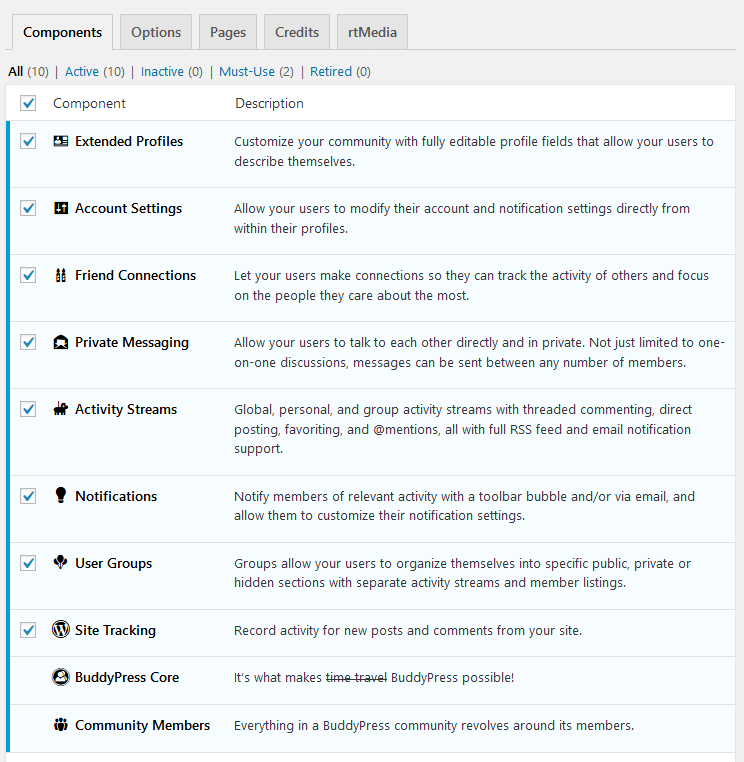
Did you enable all buddypress components under Settings → Buddypress http://diaboliquedesign.com/demo/communityjunction/Help/assets/components.png
If yes then please enable debug mode – https://codex.wordpress.org/Debugging_in_WordPress and post error here.
KeymasterThe fixed version of theme was uploaded and waiting for review, you will be notified via e-mail. Changelogs – http://diaboliquedesign.com/demo/cinematix/changelogs.txt
KeymasterHello,
It will be fixed tomorrow.KeymasterSeptember 7, 2018 at 08:46 in reply to: Members Page Are Not ShowingHello
Is it working when a default WP theme is active?KeymasterOpen bbpress.php and paste
<?php bbp_breadcrumb(); ?>after:
<div class=”page-title”><?php the_title(); ?></div>KeymasterHello, please enable a debug mode and post error here.
KeymasterIt looks like the problems occurs on 3rd level of comments tree. I will fix it after this weekend because this I will be off-line.
KeymasterKeymasterHello,
I can’t duplicate your problem on the live demo -> https://imgur.com/tyZMbgh
Is it gravatars images?
KeymasterAugust 29, 2018 at 09:44 in reply to: Error on profile uploading pageHello,
Please open wp-content/themes/cinematix/members/single/profile/change-avatar.php
remove everything and paste it – https://pastebin.com/stnpdzf6KeymasterAugust 28, 2018 at 08:56 in reply to: BP SImple Front End PostNo, live demo doesn’t cointain this plugin. If you want to use this plugin then you should follow the plugin’s documentation.
KeymasterAugust 27, 2018 at 13:15 in reply to: Changing Demo Home Page ImageYou should remove forum shortcodes in the elementor frontpage.
KeymasterAugust 27, 2018 at 09:41 in reply to: Changing Demo Home Page ImageIt happens because elementor template cointains bbpress shortcodes. Anyway it works fine now. Before you disable a bbpress plugin please make sure page doesn’t contain bbpress elements.
KeymasterAugust 25, 2018 at 08:25 in reply to: Changing Demo Home Page ImageI didn’t receive any e-mail. Try to send it via contact form – https://themeforest.net/user/diabolique
KeymasterAugust 23, 2018 at 18:05 in reply to: Changing Demo Home Page ImageSend it to info@diaboliquedesign.com
KeymasterAugust 23, 2018 at 14:26 in reply to: Changing Demo Home Page ImageI think the only way is to send me the login details do your wp dashbords so I will check it out.
KeymasterAugust 23, 2018 at 13:58 in reply to: Changing Demo Home Page ImageInstructions are a little bit different – https://imgur.com/1BGbr6a
KeymasterAugust 23, 2018 at 13:06 in reply to: Changing Demo Home Page ImageHere is the latest version of doc – http://diaboliquedesign.com/demo/communityjunction/Help/
KeymasterAugust 23, 2018 at 09:22 in reply to: Changing Demo Home Page ImageTry to create a new page with selected Frontpage Page Builder page template and import the elementor template.
KeymasterAugust 21, 2018 at 19:53 in reply to: Changing Demo Home Page ImageDid you install demo content? If not then did you import Elementor template (frontpage-elementor.json)?
KeymasterAugust 21, 2018 at 07:52 in reply to: Changing Demo Home Page ImageChange the Frontpage 1 for the Frontpage Page Builder