-
DD
KeymasterMarch 4, 2020 at 11:22 in reply to: Problems with AJAX?Remove the onecommunity shortcodes plugin and install it once again using plugins installation wizard.
KeymasterMarch 4, 2020 at 11:08 in reply to: Problems with AJAX?Make sure there is following file wp-content/plugins/onecommunity-shortcodes/inc/bp-activity-entry.php
KeymasterMarch 4, 2020 at 11:03 in reply to: Redirect after loginYou should enable the youzer login window -> https://themeforest.net/item/onecommunity-buddypress-theme/3713046/faqs/42427
KeymasterKeymasterMarch 2, 2020 at 13:11 in reply to: Redirect after loginHello
Where exactly did you choose this setting?
KeymasterMarch 2, 2020 at 13:06 in reply to: I cannot click some buttonsCan you give me the list of these words you can’t translate and what pages contain these words?
KeymasterMarch 2, 2020 at 11:47 in reply to: I cannot click some buttonsHello
It was caused by the litespeed cache plugin and its all javascript files combining (optimize tab). I disabled it and it works fine now.
Keymasterget_the_title(get_option(‘page_for_posts’)); and get_permalink(get_option(‘page_for_posts’)) used in single.php returns title of the single post and slug instead so it won’t work. Anyway I have added a customizer option for this in the next version so it won’t be hardcoded anymore.
KeymasterFebruary 26, 2020 at 12:02 in reply to: Problems with AJAX?The ip address is following 93.105.176.172
KeymasterPlease remove the OneCommunity Shortcodes plugin and install v3.4.0.1 using the wizard.
KeymasterFebruary 26, 2020 at 11:29 in reply to: Problems with AJAX?There is still the 2.3.7 version on your website. I need access to ftp too.
KeymasterFebruary 26, 2020 at 11:07 in reply to: menu container above rightI can’t see any problems on mobile device (chrome) too – https://imgur.com/a/THL589y
KeymasterFebruary 25, 2020 at 14:40 in reply to: Anchor style not displayingDo you mean link? It works fine (3rd line contains underline) – https://diaboliquedesign.com/demo/onecommunity-new/about-us/
KeymasterFebruary 25, 2020 at 14:18 in reply to: Problems with AJAX?Try to upgrade the youzer version to 2.3.9, delete old version of youzer and install the new one using the plugins installation wizard.
KeymasterFebruary 25, 2020 at 13:51 in reply to: menu container above rightHello
I can’t duplicate your problem – https://diaboliquedesign.com/screenshots/2/screenshot_at_14-49-01.jpg
Does it happen on the all profile pages?
KeymasterFebruary 25, 2020 at 13:34 in reply to: New install setup questionsPaste following code in the theme’s functions.php file
add_theme_support( 'wc-product-gallery-lightbox' ); add_theme_support( 'wc-product-gallery-zoom' );KeymasterFebruary 22, 2020 at 22:39 in reply to: I cannot click some buttonsWell, I need to check out your website because I can’t duplicate your problem on the live demo.
KeymasterFebruary 22, 2020 at 00:02 in reply to: Bug in single eventPlease open following files
wp-content/themes/onecommunity/single.php
wp-content/themes/onecommunity/single-event.php
..and remove this part of code
<?php $last_name = get_the_author_meta('last_name'); if($last_name != '') { echo '<br>' . $last_name; } ?>KeymasterFebruary 21, 2020 at 23:57 in reply to: Problems with AJAX?I can’t duplicate your problem -> https://diaboliquedesign.com/screenshots/1/Screenshot-at-00-56-11.png
Please make following setting in the wp-config.php filedefine( 'WP_DEBUG', true );and post error here. If there won’t be any error then I need access to your WP dashboard.
KeymasterFebruary 21, 2020 at 23:51 in reply to: I cannot click some buttonsHello
Do you have the same problem when a default WP theme is active and the onecommunity shortcodes plugin is inactive? After click make sure there is no javascript error, open website in chrome and press ctrl + shift + i -> console
KeymasterThank you, I will take a look on it after this weekend.
KeymasterFebruary 20, 2020 at 23:44 in reply to: WP Ulike missing buttonHello
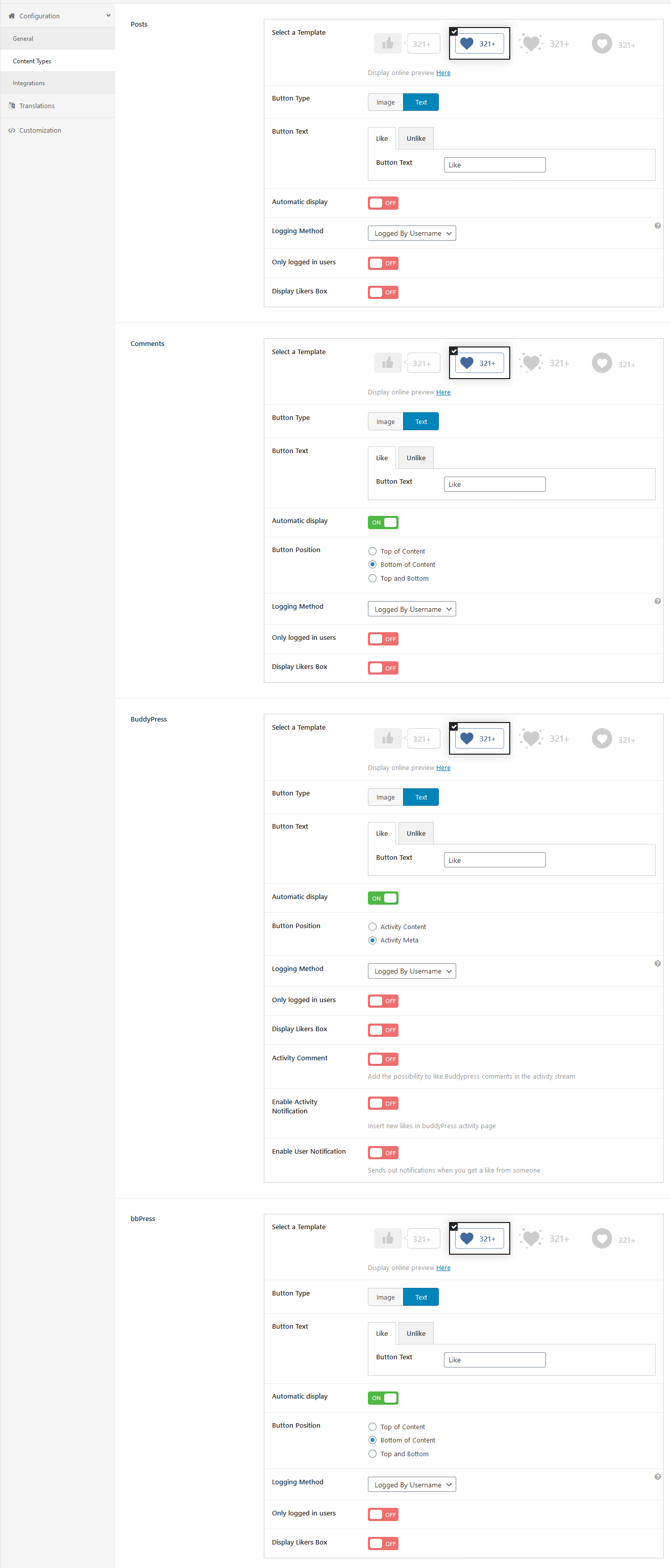
This screenshot is valid for 4.1.6 – https://diaboliquedesign.com/demo/onecommunity-new/Help/assets/ulike.png
You should copy all settings.-
This reply was modified 6 years ago by
DD.
KeymasterYou should remove
in #_LOCATIONTOWNfor this shortcode via elementor.Add
limit="10"aftermode="monthly"KeymasterFebruary 20, 2020 at 23:38 in reply to: Bug in single eventHello
Do you see the same problem on the blog post too? – https://diaboliquedesign.com/demo/onecommunity-new/an-amazing-camera-and-serious-ai-smarts/
KeymasterYou can keep bbpress.php in your child theme, this file is updated very rarely.
KeymasterFebruary 20, 2020 at 23:30 in reply to: Problems with AJAX?Does it work with a default wp theme?
KeymasterFebruary 19, 2020 at 11:02 in reply to: Problems with AJAX?Hello
Does it work when a default WP theme is active and OneCommunity Shortcodes plugin is inactive? What version of the youzer plugin do you use? There can be conflict with some plugin.
KeymasterYou should open wp-content\plugins\onecommunity-shortcodes\inc\blog.php and change
cat=0in 2 places.Keymaster1. Does it happen when you are logged in or logged out? Make sure the cache is disabled under appearance -> cuztimize -> transients
2. It’s hardcoded in
plugins/onecommunity-shortcodes/inc/gamipress.php
You should replacemembers/in few places. I will add shortcode parameter with slug in the next release.KeymasterIt looks like you didn’t imported pages from xml files -> http://diaboliquedesign.com/demo/onecommunity-new/Help/
2. Go to Tools → Import and install WordPress importer. Now run importer and import pages (save as).
After import you should remove all duplicated pages with a *-2 slug.
KeymasterYou are editing wrong page, this frontpage is for developers which doesn’t need elementor, you should edit the Frontpage 2 Elementor page.
KeymasterThis shortcode work in a different way, cat_id let you decide what categories will be visible on the menu and always all recent posts will be displayed firstly.
KeymasterFebruary 18, 2020 at 13:32 in reply to: New install setup questions1. It looks fine – https://diaboliquedesign.com/screenshots/2/screenshot_at_14-20-29.jpg
3. Try following css
body { padding-top: 65px!important; }
@media screen and (max-width:760px)
{
body { padding-top: 45px!important; }
}
4. Does it work when a default WP theme is active?
5. Open following files
wp-content/themes/onecommunity/img/bell.svg
wp-content/themes/onecommunity/img/messages.svg
wp-content/themes/onecommunity/img/mobile-menu.svg
wp-content/themes/onecommunity/img/search.svg
(this icon can be in different location,
you should find it under ajax search pro settings)
and change #323232 for #ffffff
6. I think since this is just notice not error, you should just disable a debug mode in the wp-config.php file.
KeymasterIn elementor you should remove the animated-shapes-container class for top section – https://diaboliquedesign.com/screenshots/2/screenshot_at_13-47-12.jpg
..and put some background over here – https://diaboliquedesign.com/screenshots/2/screenshot_at_13-47-34.jpgKeymasterHello
Please go to customizer -> transients and make sure the Enable transients for the category posts shortcode on frontpage option is disabled.
KeymasterFebruary 17, 2020 at 12:07 in reply to: New install setup questionsIt’s all happens because the OneCommunity Shortcodes plugin is inactive. Since 3.6 version this plugin is installed from this url – https://diaboliquedesign.com/bundled-plugins/onecommunity-shortcodes.zip
KeymasterDo you see the same error when a default WP theme is active and OneCommunity Shortcodes plugin is disabled? There can be conflict with some plugin.
KeymasterPlease open the wp-content/plugins/wp-ulike/wp-ulike.php file copy all code, paste it on https://pastebin.com and then post link to this code here
KeymasterFebruary 16, 2020 at 13:16 in reply to: Youzer loginDo you use multisite?
KeymasterFebruary 16, 2020 at 09:44 in reply to: Error YouzerSince the 3.6 version of theme the youzer plugin is installed from this url -> https://diaboliquedesign.com/bundled-plugins/youzer.zip
-
This reply was modified 6 years ago by
KeymasterWhat version of wp ulike do you use?
KeymasterYou should enable the wp ulike plugin, if you want to keep it disabled then what page shows this error? Frontpage?
KeymasterFebruary 15, 2020 at 23:59 in reply to: Plugin error at installationHello
You should activate the buddypress plugin
KeymasterHello
Try to enable a debug mode and post error here. Debug mode you can enable in the wp-config.php file, make following setting
define( 'WP_DEBUG', true );KeymasterFebruary 15, 2020 at 20:55 in reply to: Error YouzerThere is available 2.3.9 version, you can update it removing youzer plugin and install it once again using plugins installation wizard
KeymasterFebruary 15, 2020 at 12:01 in reply to: Youzer loginHello
Do you see the same problem with a default WP theme? Make sure there is no duplicated login pages (in the trash too)/
KeymasterFebruary 15, 2020 at 11:58 in reply to: Error YouzerHello
What version of youzer plugin do you use? What page displays this error? -> https://diaboliquedesign.com/demo/onecommunity-youzer/
KeymasterFebruary 14, 2020 at 10:06 in reply to: BUG: Add files button reloads the page instead of showing media modal windowHello
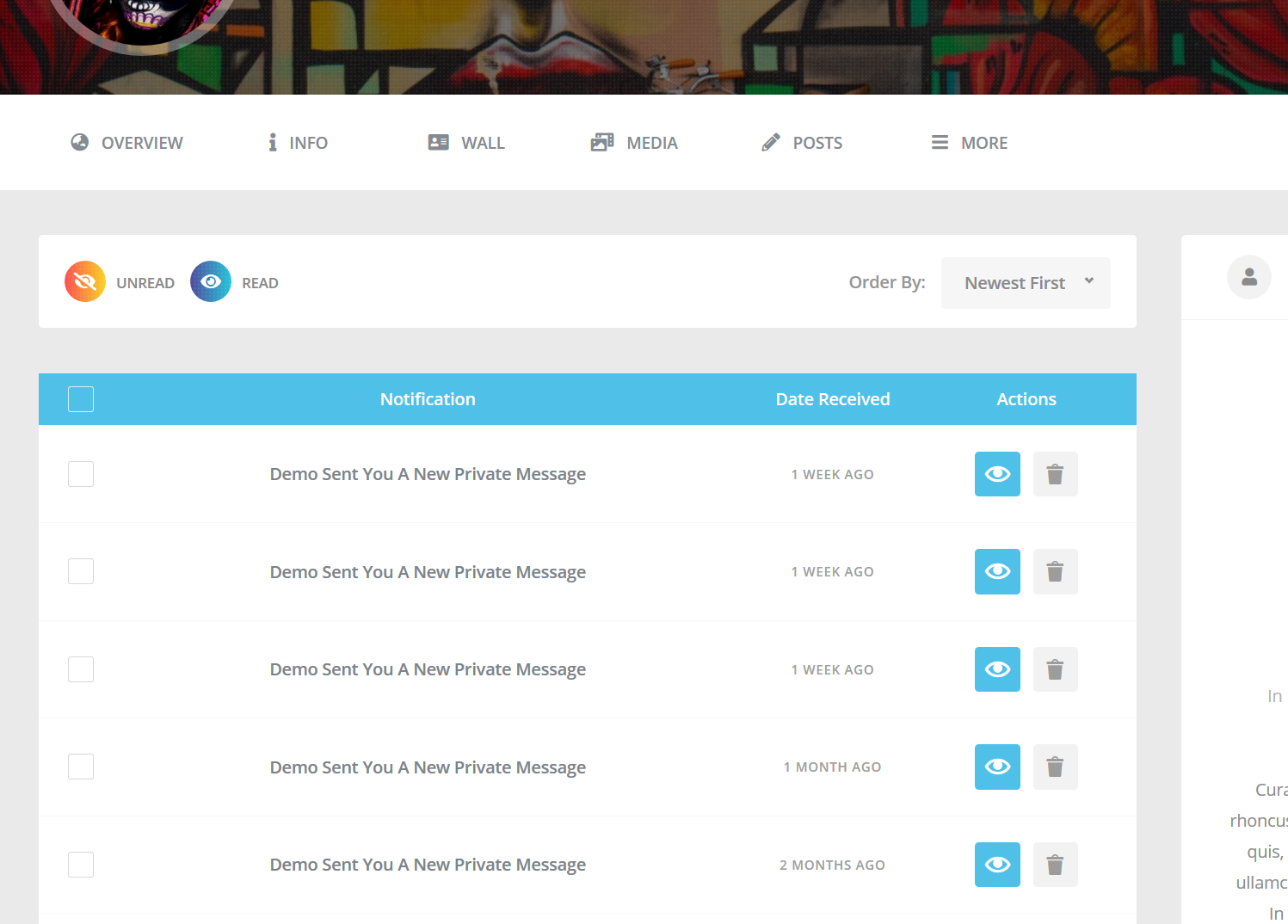
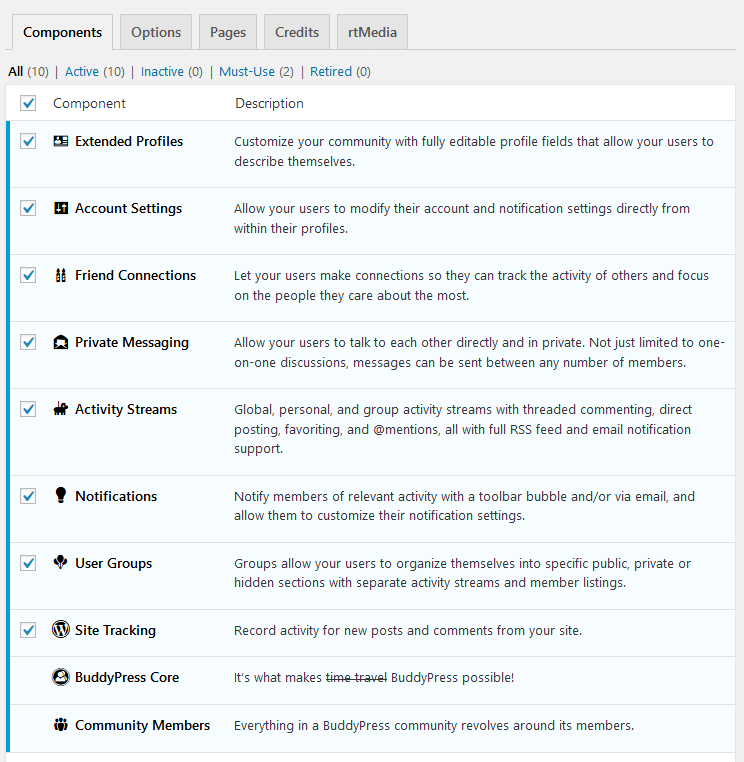
You should enable notifications module under buddypress settings – http://diaboliquedesign.com/demo/communityjunction/Help/assets/components.png
KeymasterHello
You can disable it under appearance -> customizer -> general
KeymasterFebruary 12, 2020 at 19:05 in reply to: Group page layout as on demoUnfortunately theme supporting youzer offers youzer design -> https://youzer.kainelabs.com/members/youzer/
KeymasterFebruary 12, 2020 at 12:27 in reply to: Group page layout as on demoThis is a different version of theme working without youzer.
KeymasterFebruary 12, 2020 at 12:21 in reply to: Login Button doens't workI have fixed it on your website, it works fine now.
KeymasterFebruary 12, 2020 at 11:12 in reply to: One more debug questionHello
As far as I know it was a bug of the older version of youzer. Try to remove the youzer plugin, and install once again with plugins installation wizard.
KeymasterFebruary 12, 2020 at 11:10 in reply to: Group page layout as on demoIt looks fine – https://diaboliquedesign.com/screenshots/2/screenshot_at_12-10-15.jpg
KeymasterI don’t see any breadcrumbs on your website
KeymasterFebruary 12, 2020 at 10:40 in reply to: missing Ultimate solution…after im logout I get that message..
It’s because you duplicated the Login page, now it works fine. From theme doc -> http://diaboliquedesign.com/demo/onecommunity-new/Help/#installation
TIP: If you activate plugins before pages import then importer will duplicate pages, you should go to Pages -> All Pages and delete duplicated pages with the *-2 slug permanently because there will be problem with the not found error.
-
This reply was modified 6 years ago by
KeymasterFebruary 12, 2020 at 10:33 in reply to: missing Ultimate solution…There was added for-logged-out-users class to the element which hides elements for guests. Probably you duplicated ads from demo. Also changes wasn’t visible because the SG Optimiser caching.
KeymasterFebruary 11, 2020 at 13:28 in reply to: missing Ultimate solution…You can send it via contact form – https://themeforest.net/user/diabolique
KeymasterFebruary 11, 2020 at 12:54 in reply to: Elementor problemsMake sure you selected the Frontpage Page Builder page template.
KeymasterIt looks like you selected wrong page template, it should be the Frontpage Page Builder page template.
KeymasterFebruary 11, 2020 at 12:49 in reply to: crashed front pageHello
Elementor template is in the Elementor folder (frontpage-1.json or frontpage-2.json), you can import it clicking on the button below all content – https://diaboliquedesign.com/demo/cinematix-new/Help/assets/elementor-add.png
Add Template button -> Import Template, upload the Elementor/frontpage-1.json file from the zip file downloaded from Themeforest and click on the Insert button.-
This reply was modified 6 years ago by
KeymasterFebruary 11, 2020 at 12:27 in reply to: missing Ultimate solution…Does it disappear under elementor window too? – https://diaboliquedesign.com/screenshots/2/screenshot_at_13-26-36.jpg
I can’t duplicate your problem – https://diaboliquedesign.com/screenshots/2/screenshot_at_13-23-52.jpg
Can you test it with youzer plugin and a default WP theme?ps I didnt get mail notification about reply
Are you talking about reply on activity page or forum reply page? Can you check out the spam folder?
KeymasterHello
You can always install all plugins manually if there is something wrong with installer, link you can find in the functions.php file, search for
bundled-pluginskeyword.Did you follow this chapter? – https://diaboliquedesign.com/demo/cinematix-new/Help/#menu
KeymasterFebruary 10, 2020 at 10:26 in reply to: Full Translation to SpanishHello
Thank you, but today or tomorrow will be released a significant update so few translations won’t be valid anymore.
KeymasterFebruary 10, 2020 at 10:10 in reply to: Debug questionHello
Please open wp-content/plugins/onecommunity-shortcodes/inc/blog.php and replace
$temp = $wp_query;
$wp_query= null;
for
$wp_query = null; $temp = $wp_query;KeymasterFebruary 10, 2020 at 09:22 in reply to: missing Ultimate solution…Hello
What frontpage do you use? Is it editable elementor frontpage or static frontpage?
How can I change “community groups” on home page I want to write “clubs”
You should translate the OneCommunity Shortcodes plugin using loco translate, you can find more info in theme doc.
About page groups how can I change the layout (design of the cards)
Are you talking about this page? How do you want to customise it?
can I as admin only create groups so members cant create groups.. lots of questions
Please go to settings -> buddypress -> uncheck Enable group creation for all users
KeymasterFebruary 8, 2020 at 15:17 in reply to: All in one migration troubleHello
Yes of course. BTW, there is possible direct database import working on 100% hostings too – http://support.diaboliquedesign.com/forums/topic/i-cant-import-demo-content/
KeymasterFebruary 6, 2020 at 10:08 in reply to: Problems with Internet ExplorerHello
IE11 was replaced by Edge years ago (Edge is a default web browser on windows now), so theme doesn’t support such old web browsers anymore. Generally theme works on 95% web browsers. If you are interested I can send you code snippet showing a warning information for IE users.
KeymasterFebruary 5, 2020 at 10:51 in reply to: Youzer loginHello
You can still use top right login. You don’t have to buy youzer, version number is updated from time to time. Please keep in your mind you should use youzer with the special verison of theme which is inside the Youzer folder.
KeymasterFebruary 3, 2020 at 14:42 in reply to: DD Hide Admin BarHello
You can download it here – https://diaboliquedesign.com/bundled-plugins/dd-hide-admin-bar.zip
-
This reply was modified 6 years ago by