-
DD
KeymasterJune 8, 2021 at 09:46 in reply to: Edit home page?First of all you can’t customize the Homepage page with Elementor, you can customize the Frontpage 1 Elementor page with selected the Frontpage Page Builder page template (not Frontpage 1).
https://diaboliquedesign.com/demo/cinematix-new/Help/#elementor
KeymasterJune 1, 2021 at 15:16 in reply to: Budddypress theme plugin activation showing errors on the website.You should enable all buddypress components under Settings → Buddypress → Components
KeymasterPlease take a look on it – https://codex.buddypress.org/getting-started/customizing/customizing-labels-messages-and-urls/ (Slugs chapter) and this one -> https://buddypress.org/2009/05/customizable-slugs-in-buddypress/ but I’m not sure it will work with youzify.
KeymasterAs far as I know slugs are not translatable, when you go to wp dashboard -> youzify -> profile settings -> tabs settings there is a title change option available only.
KeymasterDemo content includes WP Super Cache and LiteSpeed Cache. Speaking about the siteground I think their support knows the best solution.
KeymasterHello
Phone Number is visible https://diaboliquedesign.com/screenshots/3/screenshot_at_16-04-37.png
There is no surname
KeymasterMay 17, 2021 at 13:45 in reply to: "the_content" area in Elementor template is not recognized anymore in home pageThere was error caused by woocommerce shortcode, it happens when you use woocommerce shortcode on the frontpage but the woocommerce plugin is inactive. As far as I remember it was fixed some time ago. You should also follow this part of the theme doc
8. Go to Elementor → Settings and setup everything like on the screenshots:KeymasterKeymasterSend it via this contact form – https://themeforest.net/user/diabolique
KeymasterI tested it on the blog-1.php page. Try to enable a debug mode in the wp-config.php file so maybe there will be some error. Also please send me login credentials to your wp dashboard so I will check it out. Make sure there is no cache plugin active.
KeymasterMay 10, 2021 at 14:37 in reply to: "the_content" area in Elementor template is not recognized anymore in home pageTry replace
while ( have_posts() ) : the_post();
	the_content();
endwhile;
for
the_content();One question: if I select ELEMENTOR CANVAS format, will it break the layout of my “Frontpage Page Builder” home page?
No, you can also export your elementor design as an elementor template and save it on your desktop.
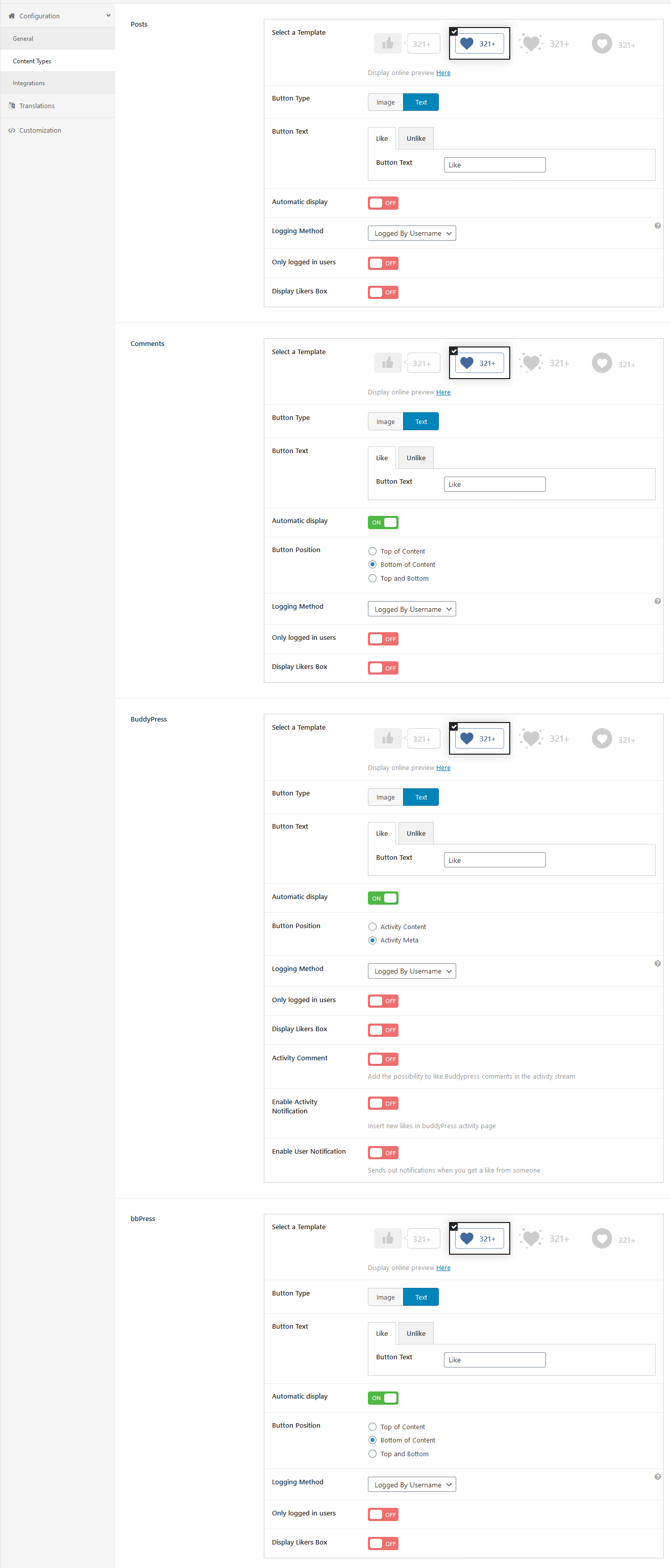
KeymasterTry to make absolutely all settings just like on this screenshot – https://diaboliquedesign.com/demo/onecommunity-new/Help/assets/ulike.png revert back the 12.4 – ULike section too.
KeymasterMay 5, 2021 at 10:53 in reply to: "the_content" area in Elementor template is not recognized anymore in home pageI can’t duplicate your problem – https://diaboliquedesign.com/screenshots/3/screenshot_at_12-51-26.png (tested the Frontpage 1 Elementor page). Please open the frontpage-page-builder.php file and make sure there is following code – https://pastebin.com/LktPeGhG
Also try to select the Elementor Canvas page template.KeymasterMay 4, 2021 at 14:17 in reply to: Can't import search instancePlease try to import this code:
https://diaboliquedesign.com/demo/onecommunity-new/Help/assets/ajax-search-pro-import.txtKeymasterMay 4, 2021 at 13:44 in reply to: "the_content" area in Elementor template is not recognized anymore in home pageHello
From theme doc – IMPORTANT! Homepage, Homepage 2, Homepage 3, Homepage 4 pages are not customisable by Elementor. You should edit the Frontpage 1 Elementor, Frontpage 2 Elementor, Frontpage 3 Elementor and Frontpage 4 Elementor pages.
KeymasterYou should setup a button position just like on this screenshot – https://diaboliquedesign.com/demo/onecommunity-new/Help/assets/ulike.png
KeymasterThis code is working
<?php wp_dropdown_categories(); ?>result – https://diaboliquedesign.com/screenshots/3/screenshot_at_15-23-07.pngI’m sorry there is a duplicated echo which it shouldn’t be there
<?php echo echo do_shortcode( '[widget id="categories-5"]' ); ?>KeymasterPlease remove the 3.1.0 version of youzify and install the 3.1.1 version.
KeymasterYou can try this code too
<?php wp_dropdown_categories(); ?>KeymasterTry following code
<?php echo echo do_shortcode( '[widget id="categories-5"]' ); ?>KeymasterIn this case if you want to use a different styling you should open style.css and remove whole 12.4 – ULike section.
KeymasterThere is possible to decide when to finish only (shift+alt+t on text editor).
KeymasterHello
You should add it in the blog-1.php file inside the
id="item-nav"div (at the beginning). You can try to add it before the theid="item-nav"div too and wrap it in the following div<div style="float:left;">...</div>KeymasterYou should change Button Type too (text instead of image).
KeymasterThis are isn’t widget ready. Categories can be added with this code
<ul>
    <?php wp_list_categories( array(
        'orderby' => 'name'
    ) ); ?>
</ul>
More info – https://developer.wordpress.org/reference/functions/wp_list_categories/
You can also add shortcodes here.
I also added that code anyhow in one community single and community youzer and also had no effect.
You should create the Age profile field first under wp dashboard -> users -> profile fields
KeymasterYes, here is explained how to do it https://elementor.com/help/create-headers/
You can do it with this free plugin too – https://wordpress.org/plugins/header-footer-elementor/
You should open header.php all<header id="main"></header>section.
In the footer.php it will be<footer></footer>KeymasterApril 30, 2021 at 10:42 in reply to: Footer is not changing?Hello
You should disable transients under customizer -> transients.
KeymasterPlease test accessing this site >> https://muffinman.io/blog/hack-for-ios-safari-to-display-html-video-thumbnail/ You will find 2 videos and please see if one of them is working on your iPhone.
KeymasterHello
Your website is asking for login credentails. Generally you should setup all settings just like on this screenshot – https://diaboliquedesign.com/demo/onecommunity-new/Help/#ulike
KeymasterThis is fixed, you should edit the wp-content/themes/onecommunity/single.php file inside the
<aside id="left"div.Use following code in the single.php file:
<?php echo bp_get_member_profile_data( 'field=Age', get_the_author_meta( 'ID' ) ); ?>KeymasterI just uploaded a new version of theme which should be approved by TF reviewer within 24h (you will be notified via the email). You should install the new version of theme, remove youzer then you should see notification on the top of the page with youzify installation suggestion.
KeymasterThis a reply from youzer dev
Please download a file from this link
https://we.tl/t-4MsBMLis64And then, upload the file into folder “youzify\includes\public\core” (replace exissting file). Clear your site and browser cache and test again.
KeymasterApril 23, 2021 at 11:28 in reply to: RTmediaIt looks like the (BuddyPress) Members widget caused the problem when friendships were disabled.
KeymasterApril 22, 2021 at 15:12 in reply to: RTmediaAre you sure you copied all code? Try to copy and paste this code – https://pastebin.com/raw/n2jbWxq6
KeymasterApril 22, 2021 at 13:25 in reply to: RTmediaPlease open wp-content/themes/onecommunity/rtmedia/main.php remove everything and paste it -> https://pastebin.com/n2jbWxq6
KeymasterHello
I reminded about it to the youzify developer – https://diaboliquedesign.com/screenshots/3/screenshot_at_14-01-06.png
KeymasterYou can enable the login popup under appearance -> customizer -> general
KeymasterApril 19, 2021 at 12:55 in reply to: demo not importingYou should unzip this file, inside should be the onecommunity-theme.zip file with theme which you should upload.
KeymasterApril 19, 2021 at 12:53 in reply to: Problem with creating usersIt means it’s a PMP plugin issue, try to uninstall this plugin, remove its tables in database and install it again.
KeymasterYou can send login credentials via the contact form – https://themeforest.net/user/diabolique
It looks like a hosting settings issue, please check it under a default theme active. Since we all are living in different time zones there is no live communication and it happens to all themeforest authors.KeymasterHello
I can’t duplicate your problem – https://imgur.com/a/tD89pdO
Maybe a database user doesn’t have an update rights? Can you change other things like a groups name?KeymasterApril 16, 2021 at 09:24 in reply to: Problem with creating usersHello
Can you test it under a default WP theme active?
KeymasterThis is not a default theme blog page, it looks like you you created it with elementor but you didn’t make it responsive.
KeymasterI reported it to the youzify dev few days ago and I’m waiting for a fix.
KeymasterApril 12, 2021 at 11:32 in reply to: Gamipress or MyCred???Well you should choose one, gamipress will work better with OneCommunity without youzify and probably youzify is ready to work better with mycred.
KeymasterTry to import some these tables via phpmyadmin – https://diaboliquedesign.com/demo/database-youzer-imp.sql
KeymasterThank you for the bug report, I’ll be working on it.
KeymasterApril 9, 2021 at 13:10 in reply to: Attachments errorPlease open the styles/unitedforum/template/attachment.html file, remove everything and paste it -> https://pastebin.com/AMFkd50U
KeymasterPlease try this snippet to fix the issue
/*
 * Remove preload meta to show video thumbnail on safari browser
 */
add_filter('youzify_get_wall_post_video', 'yzc_get_wall_post_video_remove_preload', 999);
function yzc_get_wall_post_video_remove_preload($output) {
  return str_replace('preload="metadata"', '', $output);
}
Put the snippet on the
bp-custom.phpfile inside folderwp-content/plugins. If you don’t have it yet, please create a new one.KeymasterI reported this bug to the Youzify developer then I will let you know about progress.
KeymasterFor gamification I think this one would be better
Forminator – Contact Form, Payment Form & Custom Form Builder
KeymasterHello
Yes, all plugins should work with OneCommunity if they are working with a default WP themes.
KeymasterHello
Unfortunately I didn’t test any plugin with features you mentioned.
KeymasterCan you check it out once again with the latest version of youzify – https://diaboliquedesign.com/demo/test/members/admin/activity/1439/
KeymasterHello
I can’t duplicate your problem – https://diaboliquedesign.com/screenshots/3/screenshot_at_10-30-35.png
Probably it was caused by some server resources limit. In your case the simplest solution would be install these plugins one by one, direct links to these plugins can be found in the functions.php file. Also you can just try to install a demo content.KeymasterCan you check it out on this page too? – https://diaboliquedesign.com/demo/test/members/admin/activity/1438/
KeymasterHello
Do you see the same problem on the live demo? – https://diaboliquedesign.com/demo/onecommunity-youzer/members/admin/activity/1213/
KeymasterHello
You can remove it using elementor.
Second question is why Gamipress is sending too many blank emails when somebody get registered? please tell me how to fix it
Try to go to wp dashboard -> gamipress -> settings -> emails and under email templates make
Disable achievement earned email sendingKeymasterHello
There was just uploaded 1.1 style version with all fixed, you will be notified by e-mail when it will be approved by reviewer and available to download.
KeymasterHello
There are transients enabled (fragment cache). It can be disabled under customizer.
KeymasterHello
Please disable transients under appearance -> customize -> transients
KeymasterMarch 22, 2021 at 15:37 in reply to: demo not importingAre you able to upload this demo file using some files manager like this one – https://wordpress.org/plugins/wp-file-manager/
KeymasterMarch 22, 2021 at 15:34 in reply to: Edit SidebarIt can be hidden using the option available under appearance -> customize -> general
If you want to hide it on the frontpage only then you can past following CSS under appearance -> customize -> additional css
body.home #sidenav { display:none; } header#main { padding-right:0px!important; } body { padding-right:0px!important; }KeymasterPlease go to appearance -> customize -> transients and make sure the footer transient is disabled
KeymasterMarch 20, 2021 at 14:55 in reply to: Edit SidebarAre you talking about the sliding right panel with members?
KeymasterHello
Do you see the same problem on the live demo? – https://diaboliquedesign.com/demo/onecommunity-youzer/an-amazing-camera-and-serious-ai-smarts/
KeymasterMarch 18, 2021 at 12:05 in reply to: Demo import problemIt looks like you didn’t remove all tables since it’s saying
Duplicate entry, also I didn’t notice you setup different tables prefix than wp_, I changed it to wp_ so please try again.KeymasterMarch 17, 2021 at 16:11 in reply to: Demo import problemI uploaded all files on your server, now you should go to phpMyAdmin, remove all database tables and import the dginl.nl.zip file which is in the root of your WP installation.
Login to your WP Dashboard will be following:
admin
d3d2eiedk7You can resave permalinks.
KeymasterMarch 17, 2021 at 15:21 in reply to: Demo import problemHello
There is upload problem on your hosting, I installed the WP File Manager plugin and tried upload the wp-content.zip file and it’s blocked.
KeymasterThank you for the bug report, I’ll be working on it and I will let you know about solution.