-
DD
KeymasterJune 22, 2018 at 10:07 in reply to: buddyPress nor sending emailsDo you see the same problem when a default WP theme is active?
KeymasterJune 20, 2018 at 15:06 in reply to: Issue with Group LayoutIt usually happens when some error is displayed on the top.
Also, the issue was related to length of our group names? I couldn’t figure out how it’s related.
Generally height of all items should be the same.
KeymasterJune 19, 2018 at 12:42 in reply to: Featured MemberHi
Try following css:
#sidebar .action, #sidebar .generic-button { display:none!important; }KeymasterJune 19, 2018 at 12:13 in reply to: Issue with Group LayoutYou can open groups/groups-loop.php and decrease allowed lenght here
$thelength = 20You should change it in 4 places.KeymasterHello,
Unfortunately there is no pot file for shortcodes. It’s in the wp-content/plugins/communityjunction-shortcodes/communityjunction-shortcodes.php file, 882 line.
KeymasterJune 16, 2018 at 10:30 in reply to: Add style to @ mentionsStyle of this element is in the style.css
span.user-nicenameKeymasterJune 16, 2018 at 09:55 in reply to: Prevent Topic CreationIt’s working fine on my test site
AdminMember
I used following code:
<?php if ( ! is_admin() ) { ?> <style type="text/css"> body.postid-382 .bbp-topic-form { display: none; } </style> <?php } ?>KeymasterJune 16, 2018 at 09:25 in reply to: No content in frontpageThere can be conflict with the onecommunity-blog-posts-tabs shortcode. You can remove this shortcode from page builder, if after removing the page builder works then open wp-content/plugins/onecommunity-shortcodes/onecommunity-shortcodes.php
Remove this block of code – https://pastebin.com/5Hkpnia0
and paste it – https://pastebin.com/QaihieFyNow onecommunity-blog-posts-tabs shortcode should work fine.
KeymasterJune 16, 2018 at 09:13 in reply to: BuddyPress 3.0 compatibilityOpen wp-content/themes/communityjunction/buddypress/groups/single/home.php and remove following code
// Old group forums
	elseif ( bp_is_group_forum()      ) : bp_get_template_part( 'groups/single/forum'        );
Open wp-content/themes/communityjunction/buddypress/members/single/home.php
and remove following codeelseif ( bp_is_user_forums() ) : bp_get_template_part( 'members/single/forums' );KeymasterJune 15, 2018 at 13:35 in reply to: No content in frontpageDo you using page builder backend or frontend editor?
KeymasterJune 15, 2018 at 10:41 in reply to: Prevent Topic CreationThere should be dot before bbp-topic-form
<?php if ( ! is_admin() ) { ?> <style type="text/css"> body.postid-398 .bbp-topic-form, body.bbp-parent-forum-107 .bbp-topic-form { display: none; } </style> <?php } ?>KeymasterJune 15, 2018 at 10:39 in reply to: Ajax NotificationPaste following code in the footer.php
KeymasterJune 15, 2018 at 10:31 in reply to: No content in frontpageHi,
Can you install for example this shortcodes plugin – https://wordpress.org/plugins/shortcodes-ultimate/ and test in on page builder on fresh page?
It’s a paid version with Extended License so author can include it in the theme.KeymasterJune 14, 2018 at 10:49 in reply to: Ajax NotificationThere are plans to replace this notifications system with the https://wordpress.org/plugins/buddy-notification-bell/ plugin. You can easy integrate it with theme pasting following css in style.css
.bell_notification_container { position: fixed; left: 15px; bottom:15px; padding-top: 20px; padding-right:10px; }
.bell_notification_container-inner { position: relative; }
.notification_bell { background-image: url( "images/bell.png" ); background-position: center center; background-repeat: repeat-x; width: 36px; height: 39px; background-size: 100% auto; position: relative; }
.bell_notification_container .bnb-pending-count { position: absolute!important; top:0px; right: 21px; }
.bell_notification_container .bnb-pending-notifications span { border-radius: 12px!important; padding: 0px 7px!important; background: #f05f47; font-size: 14px; }
.notifications_lists_container { position: absolute; bottom: 25px!important; width: 280px; border: none!important; }
.notifications_lists_container .notifications_lists { border: none!important; max-height: auto!important; overflow-y: visible!important; bottom:20px; }
.notifications_lists_container .notifications_lists li { padding: 5px 2px; border-bottom: 1px solid #eeeeee; font-size: 12px; }
.notifications_lists_container .notifications_lists li a { font-size: 12px; color: #464646; font-weight: 700; }
Upload this imago into images folder of theme https://image.ibb.co/hwS6kJ/bell.png
Open footer.php and remove it:<?php if ( is_user_logged_in() ) { if ( function_exists( 'bp_is_active' ) ) { if ( $notifications = bp_notifications_get_notifications_for_user( bp_loggedin_user_id(), $format = 'string' ) ) { ?> <div class="notif-container"> <?php } if ( $notifications ) { $counter = 0; for ( $i = 0, $count = count( $notifications ); $i < $count; ++$i ) { $alt = ( 0 == $counter % 2 ) ? ' alt' : ''; ?> <div class="my-notification<?php echo $alt ?>"><?php echo $notifications[$i] ?></div> <?php $counter++; } ?> </div><!-- notif-container --> <?php } else {} } } ?>Also paste following code at the bottom of js/jQFunctions.js
jQuery(function(){ if($(".notifications_lists li a.bnb-notification-text:empty").html() === "") { $( ".notifications_lists li a.bnb-notification-text:empty" ).parent().hide(); } });KeymasterJune 14, 2018 at 10:13 in reply to: Prevent Topic CreationHi,
Use following code
<?php if ( ! is_admin() ) { ?>
<style type="text/css">
body.postid-1 .bbp-topic-form, body.postid-2 bbp-topic-form, body.postid-3 .bbp-topic-form { display: none; }
</style>
<?php } ?>
Of course replace the postid-1 number which you can find in body.
KeymasterJune 13, 2018 at 10:40 in reply to: Next page for blogs doesn't workGo to WP Dashboard -> settings -> reading and make sure the Blog pages show at most setting is 9 posts. Now open index.php and replace posts_per_page=4 for posts_per_page=10
KeymasterJune 13, 2018 at 10:37 in reply to: Theme customization questionsRemove following code in the style.css file:
.page-template-blog #header-title, .archive.category #header-title, .archive.date #header-title, .archive.tag #header-title, .page-template-blog-2 #header-title, .page-template-blog-2-sidebar #header-title { background-image:none; background: #ff7701; }KeymasterHi
Paste following code in footer.php
<?php if ( ! is_admin() ) { ?>
<style type="text/css">
#whats-new-post-in option[value="1"], #whats-new-post-in option[value="2"], #whats-new-post-in option[value="3"] { display: none; }
</style>
<?php } ?>
You have to change ID of groups which you want to hide on list. Value IDs you can find browsing source code of page.
KeymasterJune 12, 2018 at 11:51 in reply to: Theme Issue with ActivationHi,
Thank you for submitting your bug report. Please open
wp-content/themes/onecommunity/registration/activate.php
remove everything and paste following code – https://pastebin.com/UBEEFAXQKeymasterJune 11, 2018 at 09:32 in reply to: Adding CoursesTry to use bigger height
.blog-thumbs-view-entry { margin-bottom:0px; min-height: 310px; }Try to use the latest verison of theme, there were fixed many small alligments. Here are changelogs – http://diaboliquedesign.com/demo/onecommunity/changelogs.txt
KeymasterJune 11, 2018 at 09:27 in reply to: Theme customization questionsIn the unitedcomunity theme you can change it under appearance -> customize.
KeymasterJune 8, 2018 at 11:04 in reply to: Theme customization questionsUse following css
.page-title { font-size:40px; padding:3% 0 3% 0; }KeymasterJune 8, 2018 at 10:35 in reply to: Theme customization questionsAre you talking about the unitedcommunity theme?
KeymasterJune 8, 2018 at 10:34 in reply to: Issue with groups w/o forumsHi,
It was changed in the new version of theme – http://diaboliquedesign.com/demo/onecommunity-theme/
Anyway still there is a tutorial about it – https://themeforest.net/item/onecommunity-buddypress-theme/3713046/faqs/13488
KeymasterJune 8, 2018 at 10:10 in reply to: Theme customization questionsEach theme has a different code structure so there is no universal code.
KeymasterJune 8, 2018 at 09:41 in reply to: Theme customization questionsDid you replace this path http://….image.jpg? There must be URL to the background image.
KeymasterJune 7, 2018 at 10:11 in reply to: How to update footer?All rights reserved by OneCommunity can be changed under appearance -> customize
Share button can be changed in wp-content/plugins/onecommunity-shortcodes/onecommunity-shortcodes.php<span class="icon-share">Share</span>KeymasterJune 7, 2018 at 09:57 in reply to: Theme customization questionsYou used wrong widget ID – #bp_core_members_widget-5
You can post URL here, tell mee what widget do you want to display on groups page and I will send you CSS code.KeymasterJune 7, 2018 at 09:53 in reply to: Buddypress Group sidebarsUnder google chrome make ctrl + u, search for sidebar-box, next to sidebar-box should be id (inique id of widget), for example
id="text-7"KeymasterYou should edit theme files directly without child theme then after update check out the changelogs – http://diaboliquedesign.com/demo/communityjunction/changelogs.txt
and then compare changes using winmerge. There is not a lot work, usually there is few files changed only.KeymasterGenerally child themes are useful if you are making small changes. Using child theme you will overwrite some code updates in future with old code.
KeymasterHi,
You can create the same website like a Linkedin website with buddypress and additional buddypress extensions, unfortunately I don’t offer any services now, all what you have to know is html, css and buddypress functions, there is no need for php programming.
KeymasterJune 5, 2018 at 10:44 in reply to: Theme customization questionsYes, of course.
KeymasterJune 5, 2018 at 10:41 in reply to: outdated version of jQuery issueI’m not allowed to update jquery version because it can cause problems with other plugins. Theme and plugin developers are allowed to use jquery version bundled with wordpress.
Am I allowed to deregister the local version of jQuery, and load the same version via CDN?
No, a theme needs to make use of the version of jQuery that the current version of WordPress ships with. Swapping out the default version causes lots of reliability issues with third-party code, especially plugins.Required to use core-bundled scripts rather than including their own version of that script. For example jQuery.
KeymasterYou are right, you should receive an e-mail notification with download available soon.
KeymasterJune 5, 2018 at 10:14 in reply to: LearnPress Curriculum not workingNo problems here – https://imgur.com/kmX68a9
Check it under a default WP theme.KeymasterTry this
.notif-container { left:30px!important; }KeymasterJune 5, 2018 at 09:53 in reply to: Error during install step 3AOpen wp-content/plugins/onecommunity-shortcodes/onecommunity-shortcodes.php and check is it containing filter_where on 918 line.
KeymasterJune 4, 2018 at 18:50 in reply to: outdated version of jQuery issueTheme uses 1.12.4 version of jquery
http://digitalscot.net/wp-includes/js/jquery/jquery.jsAs you can see it’s not loaded from theme directory. Right now all plugins/themes developers are not allowed to use different jquery version. Test this plugin under a default WP theme.
KeymasterJune 4, 2018 at 18:43 in reply to: rtMedia error on Media tabIt’s just notice, do you have disabled debug mode in wp-config.php?
define('WP_DEBUG', false );KeymasterHi,
You can change in the style.css
.notif-container { position:fixed; width:270px; z-index:1000; bottom:10px; right:30px;Replace right:30px; for left:30px;
KeymasterJune 4, 2018 at 15:27 in reply to: Error during install step 3AIt was fixed long time ago, onecommunity-shortcodes.php doesn’t contain filter_where anymore.
KeymasterJune 4, 2018 at 15:26 in reply to: O bother! A typo. :)It’s over here:
onecommunity\bbpress\feedback-no-forums.php
onecommunity\bbpress\feedback-no-replies.php
onecommunity\bbpress\feedback-no-search.php
onecommunity\bbpress\feedback-no-topics.phpKeymasterJune 4, 2018 at 15:24 in reply to: Error on Group detail pageIt was fixed in new version of theme, it was just uploaded and waiting for approve. You should be notified via e-mail.
KeymasterJune 1, 2018 at 13:16 in reply to: Adding CoursesUse following css
.blog-thumbs-view-entry { margin-bottom:0px; min-height: 270px; }Open following file onecommunity/js/jQFunctions.js and paste following code at very bottom:
jQuery(function(){
var $container = jQuery('#groups-dir-list ul');
// initialize
$container.masonry({
  itemSelector: 'li.blog-thumbs-view-entry'
});
});
Open onecommunity\groups\groups-loop.php remove everything and paste it
https://pastebin.com/4tGTVxvN
Open myStyle.css and paste following css:.group-box-details .activity { background: none; padding: 0px; color:#4b4b4b; } .group-box-details .activity:hover { background: none; }`
KeymasterJune 1, 2018 at 11:48 in reply to: Theme customization questionsGo to appearance -> customize -> additional css and paste following css
.header-title { width:100%; padding:20px 0 20px 0; } .page-title { font-size:40px; }KeymasterJune 1, 2018 at 11:38 in reply to: Buddypress Group sidebarsHi,
Use following css:
#sidebar #bp_core_members_widget-5 {display:none }
.single-item.groups #sidebar #bp_core_members_widget-5 { display:block; }
You have to change unique id of widget – #bp_core_members_widget-5, unique id you can find browsing code source in web browser.
KeymasterMay 31, 2018 at 09:42 in reply to: Adding CoursesYou should use following attribute for this shortcode
number_of_posts="8"KeymasterMay 31, 2018 at 09:37 in reply to: changing menu iconsPlease check out the chapter – http://diaboliquedesign.com/demo/communityjunction/Help/#menu-icons
KeymasterMay 30, 2018 at 13:16 in reply to: Child theme not workingPlease download and install child theme once again. It should work fine now.
KeymasterMay 30, 2018 at 10:15 in reply to: Child theme not workingHello,
Did you insntall this child theme? – https://themeforest.net/item/communityjunction-buddypress-theme/7298510/faqs/20047KeymasterMay 29, 2018 at 10:11 in reply to: Adding CoursesAre you sure you edited the groups/groups-loop.php file? You should remove forum slug in few places in this file.
KeymasterSticky badges are generated by this jquery code
jQuery(function() {
'use strict';
jQuery('table tr.sticky div.topic-title a.forum-post-title').before('<span class="sticky-label">Sticky</span>');
jQuery('table tr.status-closed div.topic-title a.forum-post-title').before('<span class="closed-label">Closed</span>');
});
Generally there is more work than expected.
KeymasterMay 28, 2018 at 10:54 in reply to: Adding CoursesYes, it should be gif image. If you want to use jpg then you should open the header.jpg file and change the .gif extension.
Please check out this tutorial – https://themeforest.net/item/onecommunity-buddypress-theme/3713046/faqs/13488
KeymasterMay 28, 2018 at 09:49 in reply to: Theme customization questionsHi,
1. Style of the top blue banner is in the style.css
.header-title { width:100%; padding:40px 0 40px 0; }
.page-title { font-size:60px; color:#ffffff; font-family: Nunito; font-weight:700; }
If you want to add background image then use following css:
.header-title { background-image: url( 'http://....image.jpg' )!important; background-position:center top; background-repeat: no-repeat; }2. Do you see this problem on the home page only? This is what I see on FF https://imgur.com/1L6mbwZ
Theme is compatible with this plugin – https://codecanyon.net/item/jetblog-blogging-package-for-elementor-page-builder/21144792KeymasterMay 28, 2018 at 09:20 in reply to: How do I change banner image?Please follow following steps in the theme doc:
Create empty page called Home (Pages → Add New) with selected Frontpage Page Builder page template:
4. Go to Settings → Reading, select Front page: Home and SAVE changes (do not touch Posts page).
5. Go to Elementor -> My Library -> Import Template -> Upload frontpage-elementor.json file. Go to Home page -> click on the Edit with Elementor -> click on the Templates folder (left-bottom corner) -> Templates Library -> My Templates -> insert frontpage-elementor.
6. Go to Elementor -> Settings and setup everything like on the following screenshots:
Also check out the V. How to use Elementor page builder? chapter
KeymasterTry following css:
.forum-author-cell { width:10%!important; } .forum-topic-cell {width:50%!important;} .forum-counter-cell {width:10%!important;} .forum-freshness-cell {width:20%!important;}KeymasterMay 25, 2018 at 13:44 in reply to: How do I change banner image?Since the new version you can change it using the Elementor page builder so you should open a home page with page editor.
KeymasterMay 25, 2018 at 09:13 in reply to: How do I change banner image?Hi,
Did you try to change it here? – https://imgur.com/keWkQfs
KeymasterMay 25, 2018 at 08:57 in reply to: Adding CoursesHello,
Please check it out – http://diaboliquedesign.com/demo/onecommunity/Help/#learnpress
KeymasterYou should use header.php file of your main theme. For example on this page – https://imgur.com/nPzjXNd you should change columns width and remove a border.
KeymasterMay 22, 2018 at 15:22 in reply to: What WordPress version?It’s over here – http://diaboliquedesign.com/demo/communityjunction/Help/assets/components.png
KeymasterHi,
This is how it looks with twentyfifteen theme – https://imgur.com/Hse3T55 https://imgur.com/t0irmfy
Theme’s main style overwrittes some parts of style.-
This reply was modified 8 years ago by
DD.
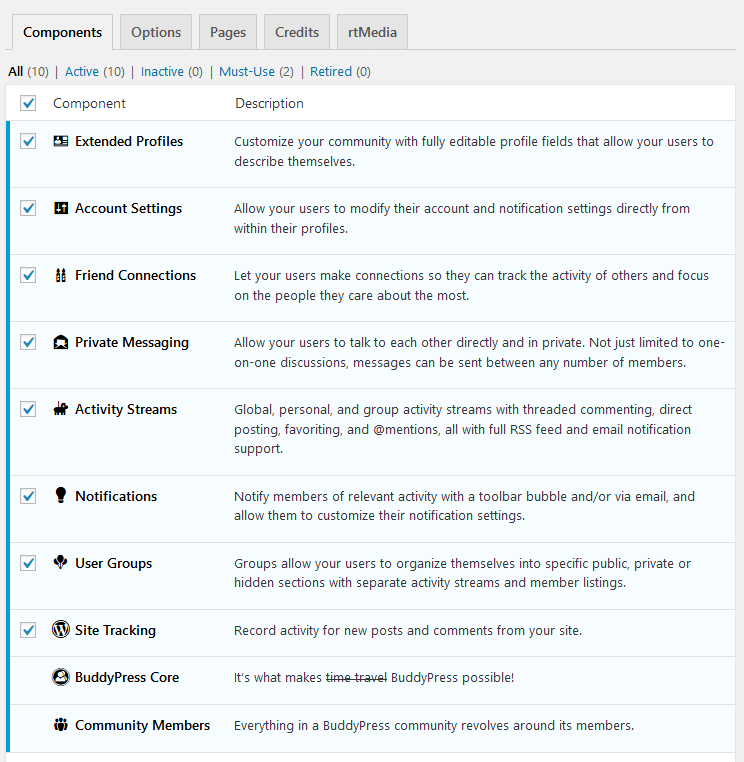
KeymasterMay 22, 2018 at 11:44 in reply to: What WordPress version?Yes, it’s compatible with the latest WP. You didn’t activate messaging component.
KeymasterMay 13, 2018 at 14:27 in reply to: header pictureHello,
You can change it with the wp customizer – https://imgur.com/1zXF05h
KeymasterMay 7, 2018 at 20:49 in reply to: a Listings plug-inHow about https://wordpress.org/plugins/review-buddypress-groups/
You can also create different group types – https://codex.buddypress.org/developer/group-types/KeymasterMay 5, 2018 at 13:30 in reply to: My websites mobile pages is too bigPaste following css in myStyle.css
@media screen and (max-width:1240px) { div#item-header { width:960px!important; } } @media screen and (max-width:960px) { div#item-header { width:600px!important; } } @media screen and (max-width:590px) { div#item-header { width:300px!important; } }KeymasterMay 5, 2018 at 09:45 in reply to: My websites mobile pages is too bigPlease disable a minify plugin so I will check out the code source.
KeymasterMay 4, 2018 at 14:06 in reply to: My websites mobile pages is too bigTry this css, it’s breaking all long words
#content { /* These are technically the same, but use both */ overflow-wrap: break-word; word-wrap: break-word; -ms-word-break: break-all; /* Instead use this non-standard one: */ word-break: break-word; /* Adds a hyphen where the word breaks, if supported (No Blink) */ -ms-hyphens: auto; -moz-hyphens: auto; -webkit-hyphens: auto; hyphens: auto; }KeymasterMay 4, 2018 at 13:59 in reply to: login aanpassen naar nederlandsHello,
You should translate unitedcommunite shortcodes plugin. Pot file is in the lang folder. More info you will find in the III. How to translate theme? chapter – http://diaboliquedesign.com/demo/unitedcommunity/Help/#translate
-
This reply was modified 8 years ago by